Equity Analysis Reports
We provide the Consolidated Equity Analysis - Template and Consolidated Other Comprehensive Income Analysis reports to help you verify the presentation of the consolidated equity results and review details of any out of balances. These reports are available in the Configuration Catalog and can be migrated to your tenant through customer central. Refer to the Configuration Catalog Guide for additional information on how to migrate this report from Customer Central to your tenant.
The Consolidated Equity Analysis - Template report—once properly updated with the appropriate configuration for the tenant—compares equity of the consolidating parent company to the total equity for the consolidated hierarchy to validate that only the parent's equity survives consolidation. Also, this report validates that total equity, minus noncontrolling interest, plus net income is equal to net assets.
The Consolidated Other Comprehensive Income Analysis report compares the portion of an investment's OCI recorded on the parent and the portion attributable to any noncontrolling interest to the total OCI on the investment and will display any out of balances.
If you have subsidiaries with noncontrolling interest, you must be opted into the new noncontrolling interest feature to use these reports, as described in Steps: Set Up for Persisting Noncontrolling Interest. When you roll forward Noncontrolling Interest Beginning Balances, use a Beginning Balance for NCI journal source.
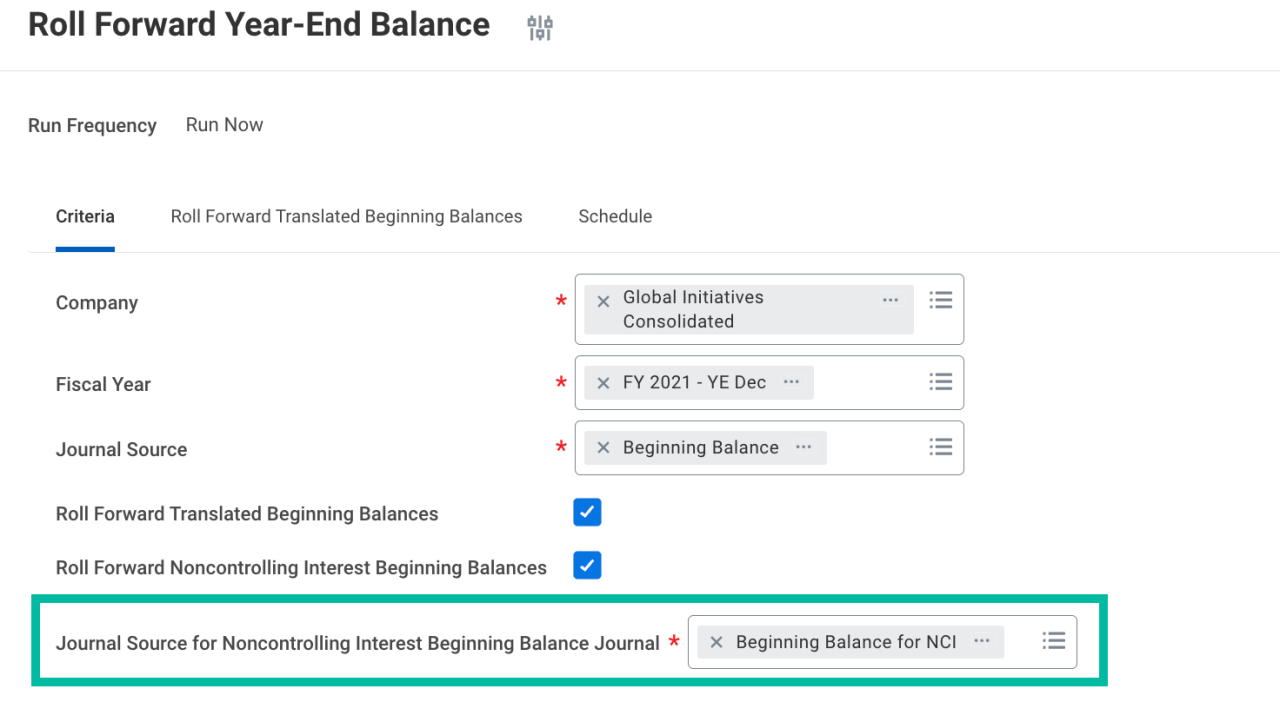
Run the reports by company hierarchy and select the appropriate parent company for the hierarchy. Any translation currency can be selected when running the reports. If you're posting CTA to a statistic account for use in Equity Pickup and NCI, be sure to select the correct reporting Book for the translation currency selected when running the reports.
When running the Consolidated Other Comprehensive Income Analysis report, select the OCI and Retained Earnings ledger accounts or account summaries in the Balance Sheet Ledger Accounts and Summaries prompt.
Below are samples of the report outputs:
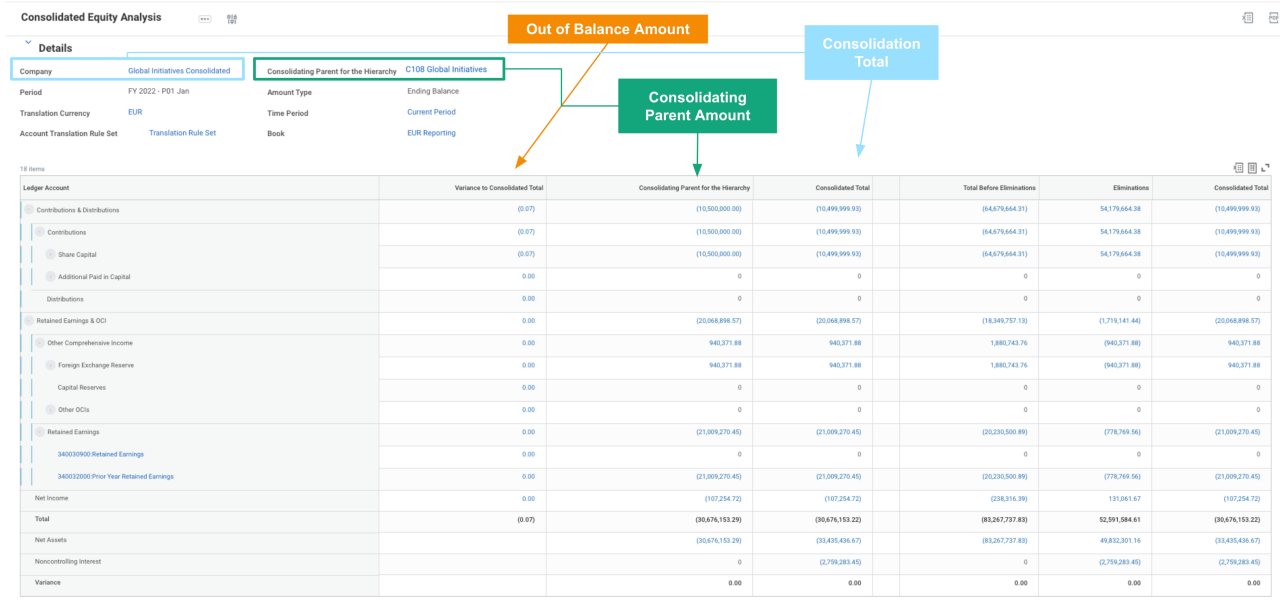
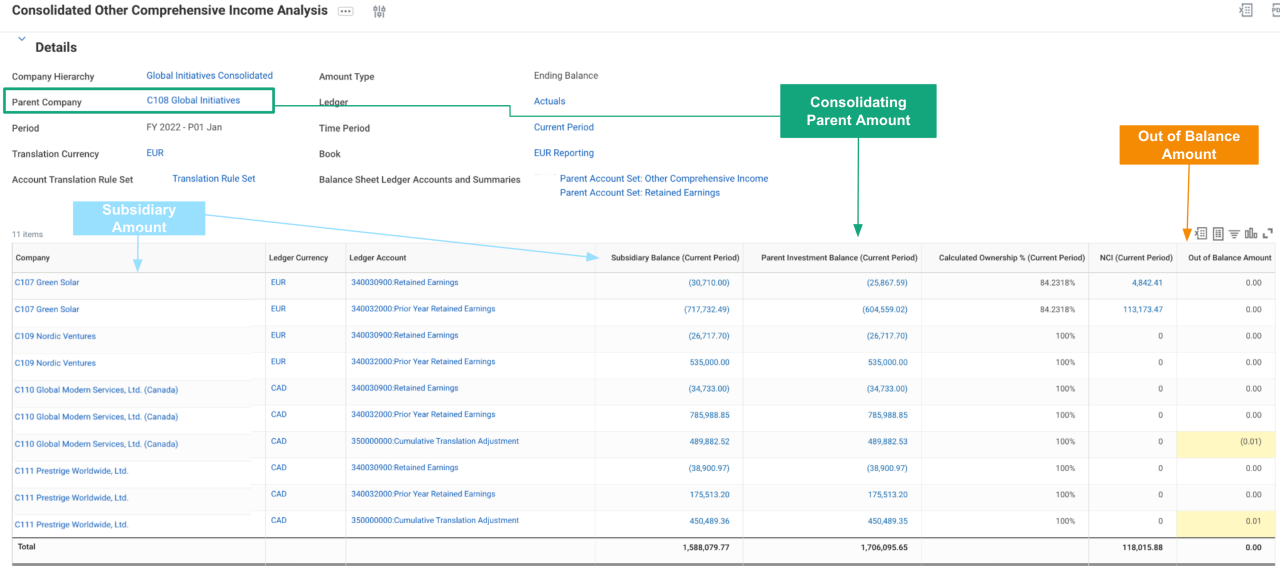
Details
Out of the Box?
- Yes. You can modify this report template per the details listed below to make the desired output.
Technology
- Composite Report
- Matrix Report
Functional Area
- Financial Accounting
Customer Central Package
WD Version
- Tested on 2023R2
Complexity
- Low
How do I get this?
Prerequisites (also called out in the Configuration Package Description)
- Journal Source: Beginning Balance, Beginning Balance for NCI
- Custom Worktag: Flow Code
The Prerequisites listed below are the security domains needed to be able to run the report.
Custom Report
- Consolidated Equity Analysis - Template
Data Source and Data Source Filter
- Journal Lines for Financial Reporting
- Journal Lines for Company and Reporting Time Period
Prerequisites
- Reports: Financial Accounting
Custom Report
- Consolidated Other Comprehensive Income Analysis
Data Source and Data Source Filter
- Journal Lines for Financial Reporting
- Journal Lines for Company and Reporting Time Period
Prerequisites
- Reports: Financial Accounting
Once you've successfully created or migrated the reports using Customer Central, follow the setup steps below to update the report based on the desired report output. If you would like to make additional changes than those outlined below, we recommend making these updates first and then creating a copy of the report to make those additional changes to.
Note: The Consolidated Other Comprehensive Income Analysis report does not require any additional updates to use, but we recommend updating the Balance Sheet Ledger Account and Summaries prompt to default the OCI and Retained Earnings ledger accounts or account summaries.
Consolidated Equity Analysis - Template
In addition to attaching the template report definition to this page, an example that illustrates the below updates is also attached for your reference.
- Hierarchy Structure:
- In the report’s General settings, add a hierarchy structure for the Ledger Account business object. This allows for ledger account summaries to be used within the lookup data rows.
- Outline Structure:
- In column C1 add an Outline Structure for ledger accounts. This allows for expansion of those ledger account summaries to the ledger account detail.
- Add lookup data rows for:
- Each of your Equity ledger account summaries
- Net Income
- Add a Total Row
- Add a calculation row using the Sum Range calculation type that sums each of the rows for Equity and the Net Income row
- Add lookup data rows for:
- Net Assets
- Use the Reverse the Sign option on this row.
- Noncontrolling Interest
- Net Assets
- Add Variance rows
- Variance 1: Add a calculation row using the Sum calculation type that sums the Total and Net Assets rows. Use the Hide Row option.
- Variance 2: Add a calculation row using the Sum calculation type that sums the Noncontrolling Interest and Variance 1 rows.
- Conditional Formatting:
- Add conditional formatting in Column C2 for the Net Assets, Noncontrolling Interest, and Variance rows to hide the cells.
- Additional changes:
- You can enable the report for use on a Dashboard by configuring the Worklet options on the Output tab.
- Formatting such as number formats, borders, etc. can be updated based on preference.
- Prompts:
- The Amount Type and Time Period prompts have been defaulted to Ending Balance and Current Period. You may choose to default some of the other prompt values like Company Hierarchy, Consolidating Parent for the Hierarchy, or Book.
Consolidated Equity Analysis Template
- Filename
- Consolidated_Equity_Analysis_-_Template (1).xlsx
- Size
- 30 KB
- Format
- application/vnd.openxmlformats-officedocument.spreadsheetml.sheet
Consolidated Equity Analysis Template
- Filename
- Consolidated_Equity_Analysis_-_Template (1).pdf
- Size
- 151 KB
- Format
- application/pdf
Consolidated Equity Analysis EXAMPLE
- Filename
- Consolidated_Equity_Analysis_-_EXAMPLE.xlsx
- Size
- 30 KB
- Format
- application/vnd.openxmlformats-officedocument.spreadsheetml.sheet
Consolidated Equity Analysis EXAMPLE
- Filename
- Consolidated_Equity_Analysis_-_EXAMPLE.pdf
- Size
- 159 KB
- Format
- application/pdf
Consolidated Other Comprehensive Income Analysis
- Filename
- Consolidated_Other_Comprehensive_Income_Analysis (1).xlsx
- Size
- 32 KB
- Format
- application/vnd.openxmlformats-officedocument.spreadsheetml.sheet
- Filename
- Consolidated_Other_Comprehensive_Income_Analysis (1).pdf
- Size
- 161 KB
- Format
- application/pdf