Ledger Period Status by Company
The Ledger Period Status by Company report facilitates the period close process by providing enhanced reporting on a companies’ ledger period status. This enables financial users to quickly see which periods are closed or open and can allow them to review what activities have already been closed. We deliver this report within the Configuration Catalog, and we recommend that you migrate the report from the Customer Central package into your tenant. See the Configuration Catalog Guide.
As a Finance Executive or Accounting Manager, I’d like to see the companies that are currently open or closed, and see details of which processes are closed. Running this report enables me to see the companies’ ledger period status for all book codes. I’m able to see which ones have a close in progress and to what capacity they’re closed, based on the activity groups.
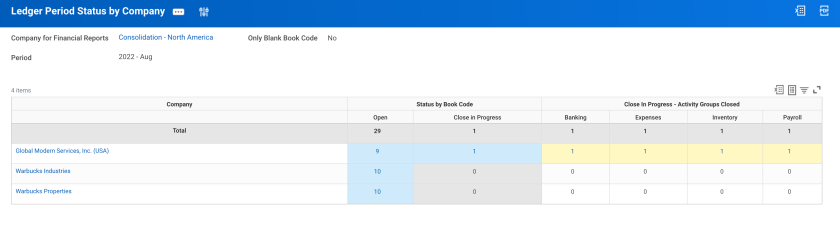
At a minimum, you’ll be able to run the report by company/company hierarchy and period. The report displays all companies and will dynamically display the ledger period statuses that are valid for each. For example, if all of the companies have a status of Closed for the period, only a column of Closed displays on the report. If the company has a period status listed as Close In Progress, all the Activity Period Groups that are closed are displayed. You can drill into any of the columns to view the detail by Book Code. To facilitate consolidation reporting, the total row has been added at the top, for quick summary level reporting.
One way to better manage the maintenance and reporting on ledger period status is to consider what book codes the Close in Progress status would actually be applicable to. Most of the period close activity groups that would contain operational transactions primarily post to the blank book code, so it might make sense to only use the Close in Progress status for the blank book code. This can make it easier to review reports such as the Ledger Period Close Status - Time Period standard report.
Below is a sample of the report output:
Design Considerations
- Repeating Column Group for Period Status:
- This dynamically brings in all statuses, except for the Close In Progress, which is brought in with the field summary of count distinct Book Codes. This is because the Close In Progress count includes all period close activity groups, which don't reflect how many book codes are closed.
- Repeating Column Group for Activity Group:
- This dynamically brings in any period close activity groups that are currently marked as Close In Progress. If the Ledger Period Status is Closed, then all groups are closed, but don’t display within these columns. They only display when the status is Close In Progress.
- Prompts:
- Book Code, Book Code to Exclude, and Only Blank Book Code: All 3 of these prompts are related to which book codes will be displayed. They can be hidden depending on what the user’s common use-case is.
- The Book Code prompt displays only book codes to filter on, but doesn't have an option for the blank book code. If left blank, it brings in all book codes including the blank book code.
- The Book Code to Exclude prompt shows book codes that you’d like to filter out. There isn't an option for filtering out the blank book code, to run the report for all book codes except the blank book code, use the Book Code prompt to select all book codes displayed in the drop-down.
- The Only Blank Book Code allows you to filter only on the blank book code by selecting it. If left blank, it brings in all book codes based on the other 2 prompts.
- Book Code, Book Code to Exclude, and Only Blank Book Code: All 3 of these prompts are related to which book codes will be displayed. They can be hidden depending on what the user’s common use-case is.
- Count Distinct Summarization:
- The subreport has a Count Distinct on a calculated field that looks at the book codes. If doing a Count on the book codes, it doesn’t return the blank book code as a value. Using a calculated field, there’s an evaluative expression to determine if the book code is blank to return a blank instance. If not the blank book code, it returns the book code instance. This allows the summarization to occur specifically for the Close In Progress to look at only the unique book codes. If doing the Count on the Close In Progress, it returns how many period close activity groups are included and doesn’t count the distinct book codes.
- There’s a separate column in the composite report specifically for the Close In Progress to do this Count Distinct on the book codes. This column isn’t in the repeating column group, but is under the same column heading of Status by Book Code.
- The subreport has a Count Distinct on a calculated field that looks at the book codes. If doing a Count on the book codes, it doesn’t return the blank book code as a value. Using a calculated field, there’s an evaluative expression to determine if the book code is blank to return a blank instance. If not the blank book code, it returns the book code instance. This allows the summarization to occur specifically for the Close In Progress to look at only the unique book codes. If doing the Count on the Close In Progress, it returns how many period close activity groups are included and doesn’t count the distinct book codes.
- Calculated Fields:
- RPT PV Ledger Period Status Activity Instance: Even though this field isn’t used within either the composite or sub report, it allows Workday to see that there’s a connection between the Instance business object to allow for the Evaluate Expression Band calculated field to be built.
Details
Out of the Box?
- Yes. You can modify this report template per the details listed below to make the desired output.
Technology
- Composite Report
- Matrix Report
Functional Area
- Financial Accounting
Customer Central Package
WD Version
- Tested on 2023R2
Complexity
- Low
How do I get this?
Prerequisites (also called out in the Configuration Package Description)
- Calculated Fields File (if building manually)
- None specific to this report if using configuration package. Others will be required for other reports within the package.
The Customer Central package matches the name of the Configuration Catalog package where the Ledger Period Status by Company report resides. When you’ve loaded it into your tenant, you can find the report in the table using a report tag that matches the Customer Central name. For more reports within the package, see RPT Consolidations.
Custom Report
Data Source and Data Source Filter
- Ledger Period Status Activity for Financial Reporting
Prerequisites
- Set Up: Ledger and Book
Once you've successfully created or migrated the reports using Customer Central, you can follow the suggested setup steps listed below to update the report based on the desired report output:
- Outline Structure:
- By default this report migrates with an outline structure for Company > Book Code. However, it isn’t be present due to the Combine data row being used. To allow the outline structure to be shown, you can update the composite report’s definition to instead use a lookup row.
- Total Row:
- The total row is at the top to support a quick summary view without needing to scroll to see those values. This can however be moved to after the Combine data row.
- Prompts:
- Time Period: The report is set up with Current Period as the default time period, as this will be the most common use-case. This can be updated and unhidden to allow users to report on more than one period (ex: Current Period YTD). Note: The report’s columns don’t change, and you need to drill down to view the different periods in the output.
- Book Code to Exclude and Only Blank Book Code: These prompts can do similar things. For example, including all book codes in the Book Code to Exclude prompt results in the same output as selecting the Only Blank Book Code prompt. You can reduce any redundancy based on the user’s comfortability.
- Sub Report - Summarization Fields:
- There are 2 summarization fields within the subreport, one for the count and one for count distinct book codes. Depending on how the customer would like to see this data within a drill-down, they can create a copy of the sub report and split these 2 summarization fields.
- Additional changes:
- Column Headers and Groupings can be updated based on user preference.
- Formatting can be updated based on how the user would like to be alerted.
- You can enable the report for use on a Dashboard by configuring the Worklet options on the Output tab.
Ledger Period Status by Company - Calc Fields
- Filename
- Ledger Period Status by Company - Calc Fields.pdf
- Size
- 390 KB
- Format
- application/pdf
Ledger Period Status by Company
- Filename
- Ledger_Period_Status_by_Company_0.xlsx
- Size
- 30 KB
- Format
- application/vnd.openxmlformats-officedocument.spreadsheetml.sheet