Supplier Accounts Match Exception Optimization Guide
A match exception is a warning indicator that identifies when an invoice and purchase order are in conflict with each other, thus preventing payment to the supplier. This guide is an aid to be used with your current business practices and help with improving the Workday match exception functionality. In this guide, we provide common match exceptions, available match exception reports, and tips you can use to get the most out of supplier invoice matching in Workday.
There are 2 main topics to consider when you’re setting up your match exception process:
- Configuration - Setting up the configuration to answer these questions.
- What does my business consider an exception that needs to be looked at further?
- Do I consider a unit cost variance an exception? What will the tolerance be?
- Do I consider a total invoice vs. total PO variance an exception? Tolerance?
- What about if my business over-receives or is over-invoiced?
- Resolution Process - Once the match rules are configured and set up, consider:
- Who should be the first to review the match exception? Will it depend on the rule?
- What tools will the teams use to resolve exceptions?
Review the tables in Design Notes for common use cases and the associated match rules and conditions.
Match exception configuration setup has several components; the setup of which has a specific chronological order. Follow the Supplier Accounts Match Process for initial or additional match rule setup.
Common Match Exception Rules
This table displays the match exception rules that are delivered in WDSetup. Your organization might have a different tolerance or currency threshold for these rules. You might also require additional currency conversion conditions on your match rules if your organization transacts in multiple currencies.
| Match Rule Name | Condition Rule Used | Use Case |
| Supplier Invoice / PO Total Amount Variance Excluding Landed Costs Exceeds Threshold | MR Sum of Invoice Total and PO Total Amount Variance Excluding Landed Costs is greater than $100.* | Used when the total invoice amount (header) exceeds the total PO amount by a defined amount. Doesn’t include shipping and other charges in the totals calculation. |
| Supplier Invoice / PO Total Amount Percent Variance Excluding Landed Costs Exceeds Threshold | MR Sum of Invoice Totals and PO Totals % Variance Excluding Landed Costs is greater than 5%.* | Used when the total invoice amount (header) exceeds the total PO amount by a defined percentage. Doesn’t include shipping and other charges in the totals calculation. |
| Supplier Invoice Line with PO but no Receipt | MR Supplier Invoice Line with PO and Amount or Quantity Received is zero. Bill Only PO equal to N. | When a PO Invoice is entered, you don’t want to pay the invoice until the goods are received and documented. Will resolve once the receipt is approved. |
| Supplier Invoice / PO Line Extended Amount Variance Exceeds Threshold | MR Sum of Invoice / PO Line Extended Amount Variance greater than $100. | Compares line total extended amounts for supplier invoices and POs. Triggers exception when the amount value is greater than the defined threshold. |
| Supplier Invoice / PO Line Extended Amount Percent Variance Exceeds Threshold | MR Sum of Invoice / PO Line Extended Amount % Variance greater than 5%. | Compares line total extended amount for supplier invoices and POs. Triggers exception when the percentage variance is greater than the threshold defined. |
| Supplier Invoice / Receipt Line Extended Amount Variance Exceeds Threshold | MR Sum of Invoice/ Receipt Line Amount Variance is greater than $100. | Compares total line extended amount between supplier invoices and receipt lines. Triggers exception when the amount variance is greater than the threshold defined. |
| Supplier Invoice / Receipt Line Extended Amount Percent Variance Exceeds Threshold | MR Sum of Invoice/ Receipt Line Amount % Variance greater than 5%. | Calculates the extended amount variance percentage between the invoice and the receipts (minus returns) for the supplier contract or purchase order line. |
Some organizations have more success resolving match exceptions when the line quantity and unit cost variances are broken out. Below are some commonly used line quantity and unit cost based match rules:
| Match Rule Name | Condition Rule Used | Use Case |
| Quantity Amount Variance between Receipt Line and Invoice Line | MR Sum of Invoice/Receipt Line Quantity Variance is greater than 0. | Calculates the gross (not including returned) receipt quantity variance for all receipts associated with the supplier invoice line. |
| Quantity Percent Variance between Receipt Line and Invoice Line | MR Sum of Invoice/Receipt Line Quantity Variance is greater than 5%. | Same as above, but used if your business operates off of a percent tolerance. |
| Unit Cost Variance between PO Line and Supplier Invoice Line | MR Invoice / PO Line Unit Cost Amount Variance is greater than $10. | Calculates the difference in Unit Cost on the PO line to the supplier invoice line. Triggered when the line variance is greater than the defined currency amount. |
| Unit Cost Variance between PO Line and Supplier Invoice Line in Base UOM | MR PO and Supplier Invoice Unit Cost Variance in Base UOM is greater than $10. | Compares the base UOM in the event that the Supplier Invoice and PO UOMs don’t match. |
| Unit Cost Variance between PO Line and Supplier Invoice Line | MR Invoice / PO Line Unit Cost Amount % Variance is greater than 5%. | Calculates the percent difference in Unit Cost on the PO Line to the related Supplier Invoice Line. |
Business Processes
In order to ensure that the Match Event runs smoothly and consistently, you need to configure a match step on related business processes. The below configuration is included within WDSetup and is used as a baseline during initial tenant build.
| Business Process Event | Order | Type | Specify | Run As User |
| Supplier Accounts Match Event | After Initiation | Batch/Job | Run Supplier Accounts Match Process | wd-support |
| Supplier Invoice Event | Initiation | Action | Supplier Accounts Match Process | Initiator |
| Supplier Invoice Event | After Completion | Service | Initiate Supplier Accounts Match Event for related Supplier Invoices | N/A |
| Receipt Event | After Completion | Service | Initiate Supplier Accounts Match Event for related Supplier Invoices | N/A |
| Receipt Adjustment Event | After Completion | Service | Initiate Supplier Accounts Match Event for related Supplier Invoices | N/A |
| Change Order Event | After Completion | Service | Initiate Supplier Accounts Match Event for related Supplier Invoices | N/A |
| Supplier Contract Amendment Event | After Completion | Service | Initiate Supplier Accounts Match Event for related Supplier Invoices | N/A |
When configured per above, business process transactions made against your supplier invoice will initiate a match event to see if any exception rules are met. If no match rules are triggered, the invoice will be promoted to ‘matched’ status.
An action step can be added to the following business processes to send an inbox task for users to Create Receipt for the related document:
- Purchase Order Event
- Supplier Invoice Event
- Supplier Accounts Match Event
We recommend the above configuration if you are using self-service receiving.
Security
- Access to configuration of match exception rules, reasons, and condition rules is under the domain: Set Up: Supplier Accounts. Modify access to this subdomain is typically granted to the Accounts Payable Configurator.
- To grant users access to perform actions on a match exception, configure security groups on action steps of the Supplier Accounts Match Event.
- Grant access to request a match exception override on the Supplier Accounts Match Event and the Supplier Accounts Match Exception Override Event (initiation step).
- It’s common practice to grant the Buyer group access to view supplier invoices. If a buyer can’t view supplier invoices, confirm that they have view access on the Process: Supplier Invoice domain and subdomains. You can also grant AP Data Entry Specialists access to view POs on the Process: Purchase Orders domain.
Configuration Tips
Use these tips to optimize your Workday match exception process:
- Update supplier accounts match rules/reasons- Update your match rule names and Maintain Supplier Accounts Match Exception Reasons to clearly articulate the issues causing a match exception. Using terminology your organization understands helps end users quickly identify match issues and possible resolution steps.
- Update document reasons - Clear document reasons can help the person working match exceptions resolves issues more quickly. The below reasons can expedite match exception resolution by providing additional context as to why a related document was adjusted:
- Supplier Accounts Match Override Reasons
- Invoice Adjustment Reasons
- Procurement Reasons > Change Order
- Procurement Reasons > Adjustment (receipt adjustment)
- Return to Supplier Reasons
- Add help text to business processes - Help text can provide information and context as to why users are getting an inbox notification. Help text can also assist them in understanding the next action they need to take on the inbox task. You can place condition rules on the help text to display different text depending on the conditions triggering the step. More information can be found in the Workday Administrator Guide.
- Use the activity stream - Use the activity stream on the supplier invoice or related business documents to improve communication between AP and Procurement staff. Minimize emails and phone calls by using the activity stream to tag an internal resource on comments directly in Workday. The activity stream also provides visibility to other teammates who might need to support matching resolution or cover for a worker. Turn on the activity stream in Edit Tenant Setup-System.
- Remove match exception business process notifications and work exceptions from reports - Some organizations find the volume of match exception notifications prevents them from focusing on more urgent requests. In this case, you can disable match exception notifications on the Supplier Match Event. Exceptions will still be generated but users would work them from a Workday report instead of their inbox.
- Update Reports - Review and configure the reports available from WDSetup to meet your business needs.
- Use work queue tags- If you’re using the Supplier Invoice Work Area, you can use work queue tags to automatically add attributes to a supplier invoice. You can also set up the work area to automatically assign invoices with work queue tags to a specific person’s work queue. It can be helpful to use tags and assign invoices to a person if they’re being generated from an integration. Since these invoices aren't initiated by an AP Data Entry Specialist, queue automation can provide clarification on who should follow up on related exceptions.
Ways to Minimize Match Exception
Match exceptions are a normal part of doing business and can’t be completely avoided. In fact, match exceptions can alert you to shipping errors, contracts that aren’t in sync, and suppliers invoicing on new pricing before the price changes are approved. These actions provide suggestions to avoid match exceptions or prevent them from becoming a larger issue for your organization.
- Regularly use the Supplier Contracts Needing Attention report to review expiring supplier contracts.
- Use POA business process alerts or the PO Lines with POA Exception report to review and work purchase order acknowledgments before invoicing.
- Alternatively, set up Workday to automatically update purchase orders with approved changes from a POA. You can use the service step on the POA business process or run a scheduled job.
- Regularly audit and update item primary pricing
- Process and track supplier returns in Workday using the Returns to Supplier In Progress report
- Use the PO Aging Report to stay ahead of match exceptions
- Use the Purchase Orders Not Received report to review lines that haven’t yet been received and quickly access associated acknowledgments
Match Exception Resolution
While every organization operates slightly differently, below is an example of a typical match exception workflow:
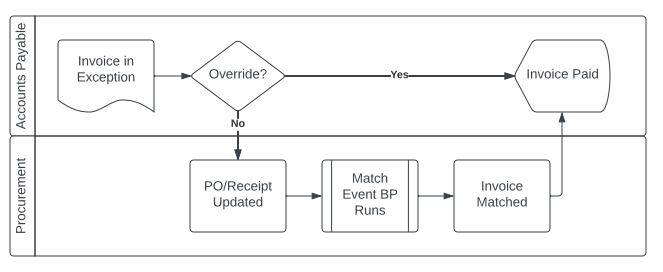
- Unit Cost Variance between PO and Supplier Invoice Lines- percent or amount. In this scenario, a Buyer might contact the supplier to verify pricing on a supplier contract. If they find the supplier invoice price is correct, they would update the PO (and related purchase items) to match the invoice price. Alternatively, if the PO price is correct, they could request the supplier to issue a credit or a credit and rebill.
- Quantity Variance between PO and Supplier Invoice Lines. In this scenario, the Buyer would work with the supplier to confirm the quantity ordered and shipped. Oftentimes, these exceptions indicate that a different UOM was sent.
- Supplier Invoice Line with PO but no Receipt. Understand which resolution steps are needed, categorize 'no receipt' exceptions into aging buckets. Common guidance for organizations with net 30 default payment terms:
- Invoices with ‘no receipt’ that fall in a 1-7 day bucket might not need additional action. Within this time range, it’s possible that the invoice was processed before the goods reached their destination.
- For invoices that are still in ‘no receipt’ exception for 14+ days, contact the supplier to confirm the shipment tracking number and delivery receipt. Once the buyer has the shipping or tracking information, work with the requester or receiving dock to confirm receipt. If the supplier doesn’t have tracking or shipment information, work with the supplier to expedite order shipment or cancel the order and ask for a credit.
Match Override versus Updating Business Documents
Some organizations have a strong preference of when to override a match exception and when they should update source documents to align with the invoice. The override functionality enables you to process and pay invoices more efficiently and requires less data entry from AP and Procurement teams.
However, some organizations prefer to update source documents to align the values on invoice, PO, and receipts instead. You might find you prefer this approach for reporting PO history data to a third party or if you use the PO price/quantity to calculate metrics (example: cost per surgical case) in other systems. To ensure a clean accounting of the average cost calculation between the put-away and invoice, don’t override no-receipt or receipt quantity match exceptions on Inventory Replenishment purchase orders.
Reports and Dashboards
Workday provides delivered and custom reports to help you resolve invoice match exceptions. Customizing these reports to your business needs will greatly improve exception visibility and reduce resolution time. The below table lists the different dashboards and reports that can be used for researching and resolving match exceptions:
| Report Name | Report Type | Report Description | Dashboard |
| Match Exceptions by Buyer | Custom - Configuration Catalog | This report displays all match exceptions per Buyer including the header and line exception. | Buyer Dashboard |
| PO Aging Report | Custom - Configuration Catalog | This report displays PO lines with outstanding receiving or invoicing lines. Also displays the days outstanding from the initial issue date or line due date. | Buyer Dashboard |
| Supplier Contracts Needing Attention | Custom - Configuration Catalog | Displays supplier contracts that are approaching expiration and ones that are approaching the maximum spend indicated. | Buyer Dashboard |
| PO Lines with POA Exception | Custom - Configuration Catalog | Report to detail out any lines on purchase orders from a POA that had a variance from the issued document. | Buyer Dashboard |
| Returns to Supplier In Progress | Custom - Configuration Catalog | Report displaying any returns to suppliers that haven’t yet completed their business process. | Supply Chain Stabilization |
| Match Exception Invoices by Supplier | Custom - Configuration Catalog | This report displays match exceptions grouped by Supplier. | Supplier Performance Dashboard |
| Supplier Invoices in Match Exception | Workday Delivered | This report enables you to view supplier invoice details in match exception. | N/A* |
*Can be configured as a Worklet and added to a Dashboard.