Google Calendar Interview Integration Permissions
This page reviews some of the technical details of the Google Calendar Interview Management integration.
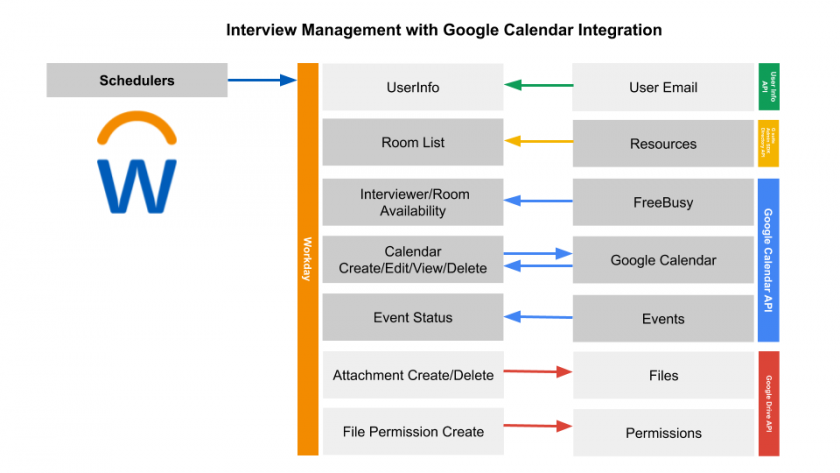
These are the permissions we ask for when using the application, and why we request them.
See, Edit, Create, and Delete All of Your Google Drive Files
Workday requires Google Drive files to store and access any attachments included in the scheduling process
Use Case: When scheduling an interview with an attachment included Workday automatically provides sharing permissions to the interview team. When rescheduling or cancelling the interview, Workday removes the file from Google Drive.
View and Manage Its Own Configuration Data in Your Google Drive
Workday requires Google Drive files to store and access any attachments included in the scheduling process.
Use Case: When scheduling an interview with an attachment included Workday automatically provides sharing permissions to the interview team.
View and Manage Google Drive Files and Folders That You Have Opened Or Created With This App
Workday requires Google Drive files to store and access any attachments included in the scheduling process.
View and Manage The Provisioning of Calendar Resources On Your Domain
Workday allows you to schedule a conference room as a part of your interview schedule.
See, Edit, Share, and Permanently Delete All the Calendars You Can Access Using Google Calendar
Workday allows you to view calendar availability, reschedule interviews, and cancel interviews that you can access using Google Calendar.