Ledger Year Beginning Balances Versus Prior Year Ending Balances Report
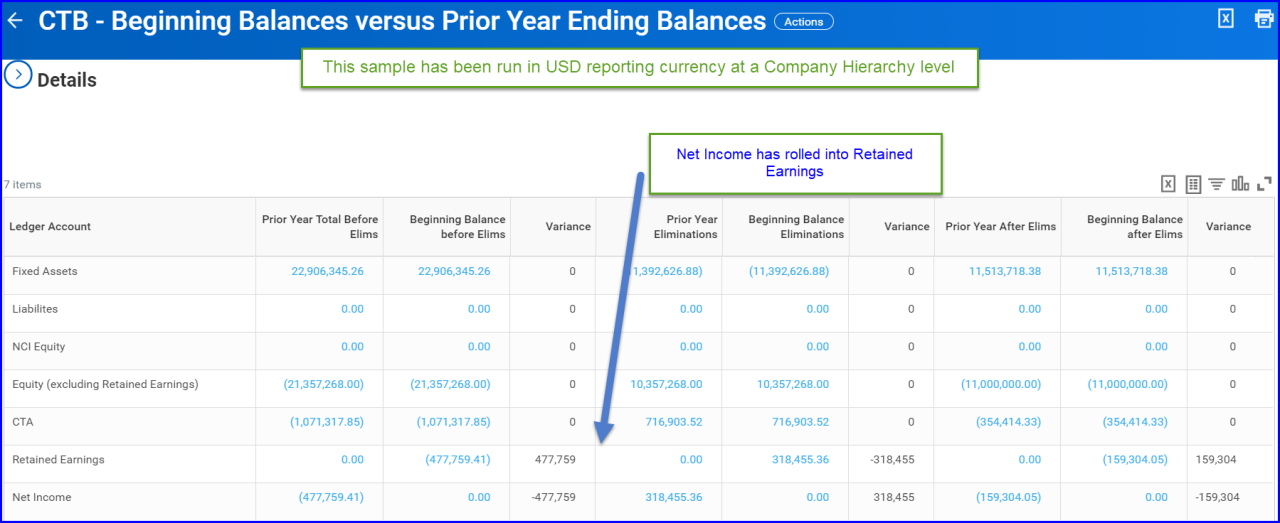
This guides provides instructions on migrating a custom report in order to compare ledger year beginning balances against prior year ending balances. A sample of the report is provided below (it can be run for any hierarchy or for any company). The intention of this report is to prove that year end closing balances match next year's opening balances. If there is a variance, you can make an additional copy of the report and have it repeat by company, rather than just running at a summary hierarchy level as shown here. The instructions are also provided.
Customer Central Package
You can use the RPT Financial Accounting customer central package to help you compare ledger year beginning balances against prior year ending balances.
| Name | RPT Financial Accounting |
| Out of the Box | Yes, you can choose to modify the reports to better fit your use case as discussed above or they can be used as is with no further modification. |
| Technology | Composite and Matrix Reports |
| Functional Area | Financial Accounting |
| WD Version | Tested on 2020R2 |
| Complexity | Low to Medium |
- Account Set: Standard
- Account Translation Rule Set called: Standard
- Fiscal Schedule ID: YE_DEC
- Ledger Type: Actuals
- Account Set ID: Standard
- Currency Rate Type ID: Current
When you run the report, choose the first period of the new fiscal year.
Note: If comparing retained earnings, it's recommended to update the sub report to include the Balance Sheet Ledger Account field according to the Redesigned Retained Earnings Reporting functionality. Once added to the sub report, a control field on the composite can be added for the Balance Sheet Ledger Account.
Here's a report sample run at a hierarchy level.
Refer to the Configuration Catalog Guide for additional information.
- Migrate the RPT Financial Accounting customer central package. See Details on getting content into tenant here.
- The customer central package listed above ties to the name of the Configuration Catalog package where the corresponding report is located. Once loaded into your tenant, you can find the reports in the table using a Report Tag that matches the Customer Central name. For more reports within the package, see RPT Financial Accounting.
| Custom Report | Data Source and Data Source Filter | Prerequisites |
| Beginning Balance vs Prior Year Ending Balances |
Journal Lines for Financial Reporting Journal Lines for Company and Reporting Time Period |
Reports: Financial Accounting |
| Sub Report - Beginning Balance vs Prior Year Ending Balances - Journal Lines Translated Summary |
Journal Lines for Financial Reporting Journal Lines for Company and Reporting Time Period |
Reports: Financial Accounting |
| Sub Report - Beginning Balance vs Prior Year Ending Balances - Journal Line Eliminations |
Journal Lines for Financial Reporting Journal Lines for Company and Reporting Time Period | Reports: Financial Accounting |
| Sub Report - Beginning Balance vs Prior Year Ending Balances - Journal Lines Translated |
Journal Lines for Financial Reporting Journal Lines for Company and Reporting Time Period | Reports: Financial Accounting |
Beginning Balance vs Prior Year Ending Balances
- Filename
- Beginning_Balance_vs_Prior_Year_Ending_Balances.pdf
- Size
- 167 KB
- Format
- application/pdf
Sub Report Beginning Balance vs Prior Year Ending Balances Journal Lines Translated
- Filename
- Sub_Report_-_Beginning_Balance_vs_Prior_Year_Ending_Balances_-_Journal_Lines_Translated.pdf
- Size
- 101 KB
- Format
- application/pdf
Sub Report Beginning Balance vs Prior Year Ending Balances Journal Line Eliminations
- Filename
- Sub_Report_-_Beginning_Balance_vs_Prior_Year_Ending_Balances_-_Journal_Line_Eliminations.pdf
- Size
- 101 KB
- Format
- application/pdf
Sub Report Beginning Balance vs Prior Year Ending Balances Journal Lines Translated Summary
- Filename
- Sub_Report_-_Beginning_Balance_vs_Prior_Year_Ending_Balances_-_Journal_Lines_Translated_Summary.pdf
- Size
- 100 KB
- Format
- application/pdf