Workday Methodology Overview - Student Customer Deployment Guide
All Workday deployments follow the One Workday Methodology. However, we do have multiple industry-driven approaches. The Student Customer Deployment Guide provides a milestone-oriented deployment based on the academic calendar. This proven, rapid methodology is based on years of experience deploying our products and is built specifically for our software-as-a-service (SaaS) delivery model.
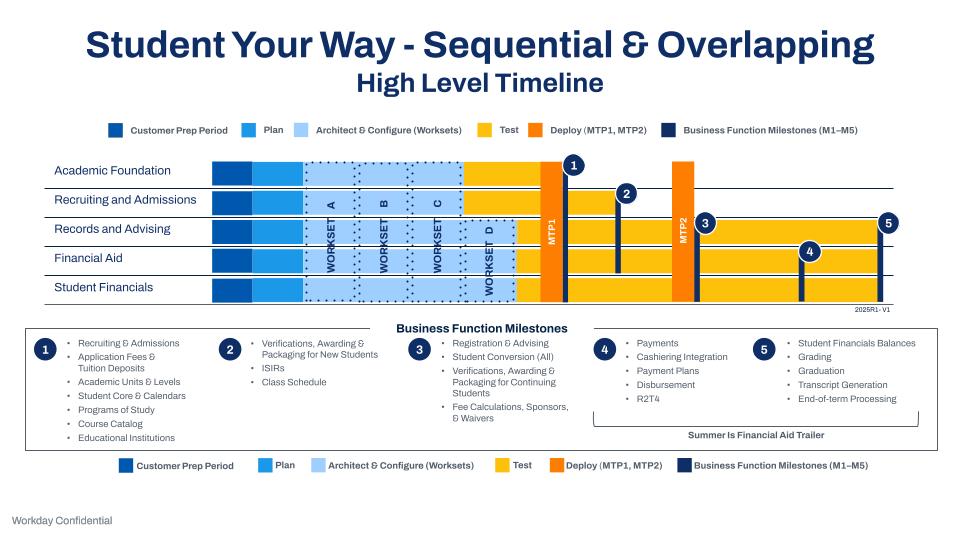
Note: Content indicated for use on sequential and overlapping deployments applies to Student Your Way - Multi-Institution and Student Launch deployments unless indicated otherwise.
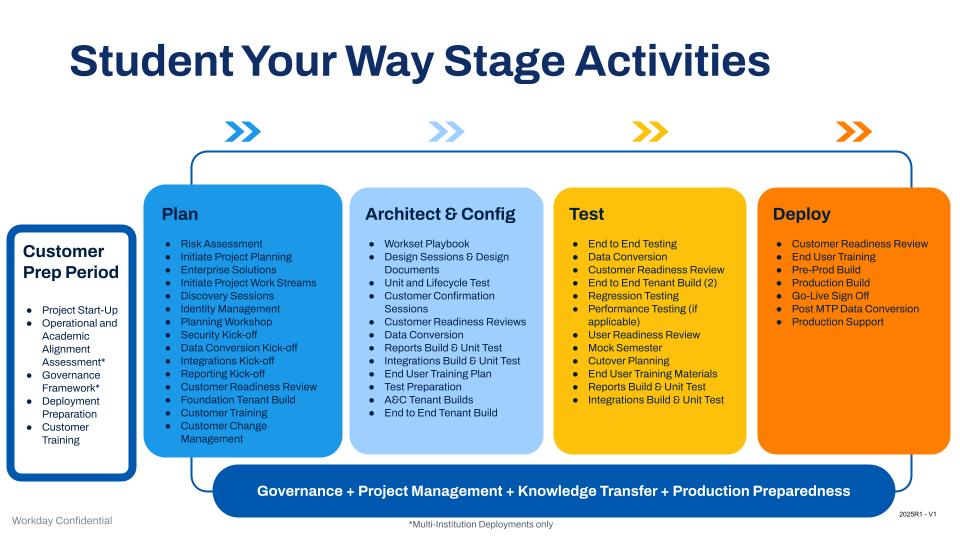
Student Your Way Stage Activities



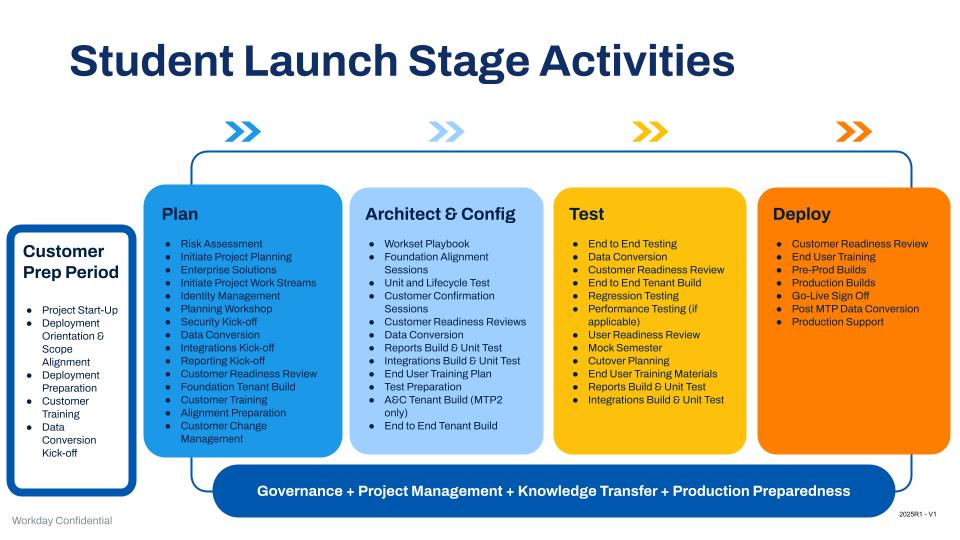
Student Launch Stage Activities
Guiding Principles for Successful Student Deployments
Prepare Your Data and Processes
- Work with your consultant to determine the volume of data needed to support your business.
- Validate, clean, and consolidate data in the legacy system before converting it.
- Define competencies that you can use long term.
- Streamline and consolidate policies.
- Partner with Workday or your implementation team to develop an overall data strategy to align technical and functional activities.
- Partner with Workday or your implementation team to determine successful criteria and thresholds for data conversions.
- Consider scope, budget, and time. You can’t increase one without increasing all.
Deployment Timing and Guidance
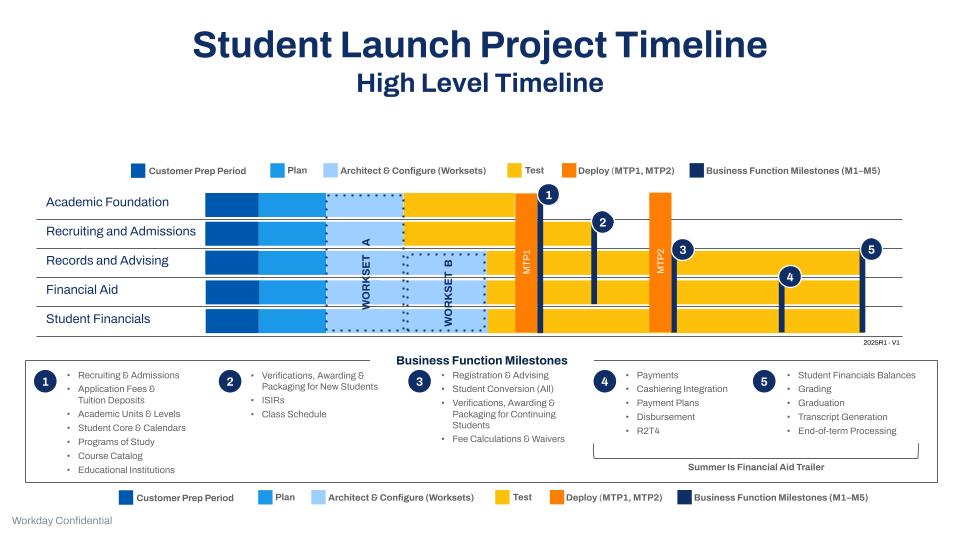
- The academic calendar, admissions applications, and financial aid awarding and packaging drive your go-lives.
- Workday doesn’t support midyear cutovers.
- A timeline delay could result in a full academic year push.
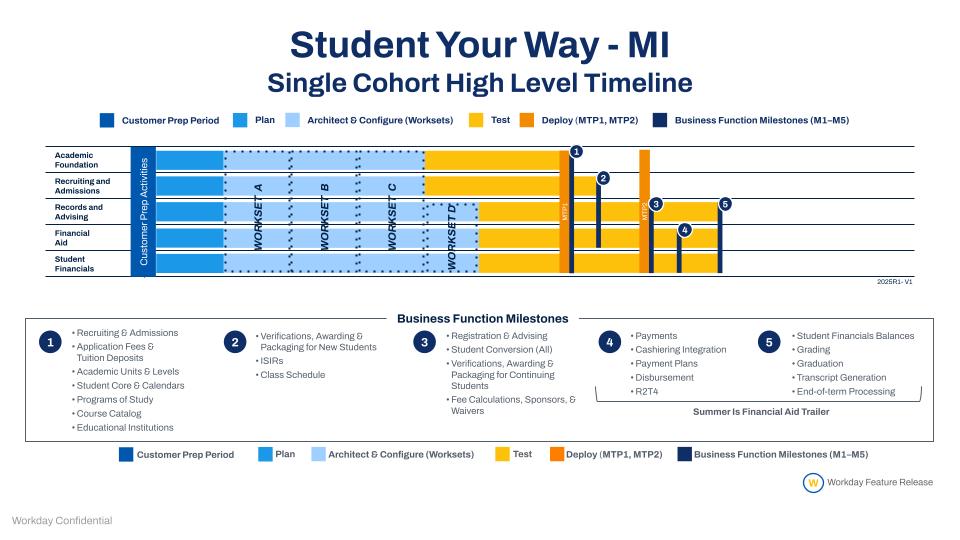
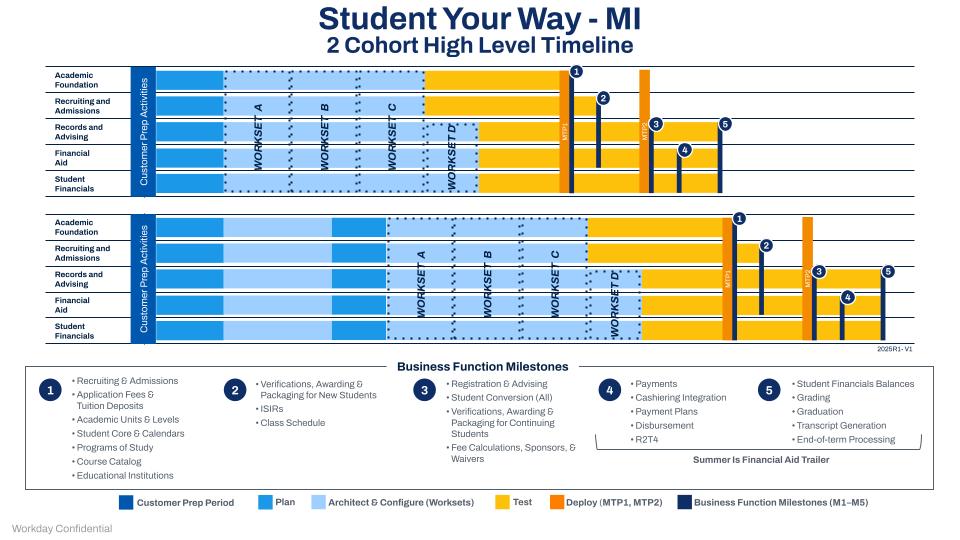
- Student deployments typically require 2 moves to Production.
- Customer staff from HCM or Financials should be involved in the Academic Foundation design or alignment; staff from the Student team should be involved in the HCM or Financials design or alignment.
- Approach calendar decisions with a cross-functional lens, including data conversion and integrations, and consider downstream impacts.
Important Configuration Guidelines
- We recommend that you adhere to the consulting guidance regarding multiple educational objectives and educational credentials so that you can optimize Workday today and in the future.
Build Internal Team
- Set expectations for time commitments with both team members and managers.
- Discuss how to balance the team’s day-to-day responsibilities with deployment priorities.
- Plan for contingencies and back up to avoid project delays.
- Share the deployment vision, objectives, scope, and timeline with team members.
- Ensure that the team is ready for remote facilitation and optimize communication channels.
- Review and plan to attend the recommended Student Customer Training.
Determine Executive Sponsors and Partnership
- Establish a Steering Committee that's highly engaged.
- Adhere to a regular meeting cadence to ensure rapid responses.
- Determine clear paths to manage key decisions and escalations.
Promote the Benefits
- Develop audience-specific communications to ensure that the right people have the right information at the right time so they can be successful with Workday.
- Identify internal champions for change management.
- Continue training and education opportunities.
- Use the Workday Community to share and learn.
- Plan for rolling adoption of new features and functional areas.

Phases and Stages
Workday’s methodology is based on key stages and phases throughout a deployment. There are 4 stages with these key objectives:
Customer Prep Period
Customer Prep is a 6–8 week period before the start of the Plan stage. During this time, the customer completes key tasks that ensure they’re prepared for Day 1 of their implementation. For Workday Primed projects, the customer should complete the Deployment Prep Navigator (DPN) and submit all Customer Information Workbooks (CIWs) prescribed in the DPN. During this window, the customer also begins Workday Education training. Learn more.
Plan
The objectives of this stage are to confirm the project scope, initiate project activities, and establish project management processes and controls. The Workday Engagement Manager (EM) or Partner Project Manager (PM) drafts and reviews the project goals, plan, timeline, milestones, deliverables, resources, and responsibilities in this stage. They initiate project work streams (functional, integrations, reporting, and so on) to align on approach, resources, and schedules. This stage starts with a project orientation meeting to begin the project planning activities. Concurrently, a project kickoff with the extended customer project team reviews the overall project—including a draft of the plan, timelines, resources, and so on. Learn more.
Architect and Configure
The objectives of this stage are to find a common understanding of the customer's business needs, to analyze how to deploy Workday to meet those needs, and to prototype configuration. During this stage, you review Workday concepts and functions, make design or alignment decisions, and complete all application configurations in Workday. You execute data conversions for both configuration data (such as setup, organizations, and business processes) and operational data (such as workers and customers). You complete integration and report development, and prepare the tenant for the Test stage. The A&C Stage comprises Worksets that include iterative design or alignment, configuration, and unit testing throughout each Workset. Learn more.
Test
The objective of this stage is to ensure that the configuration meets your needs. Each test effort has a different set of conditions and a different purpose. The test must meet the agreed-upon exit criteria for each test effort to move forward toward go-live. Learn more.
Deploy
Once you’ve met all the exit criteria for the Test stage for each Move to Production (MTP), you’re ready to move on to the Deploy stage. The objective is to go live on Workday in a Production environment using all features and integrations you configured and tested during previous stages. Student projects typically have a formal Deploy stage for each MTP. Certain Deploy stage activities that occur to support project closure only take place at the end of the project, as you approach your final business function milestone.
Phases typically represent the deployment of net new product lines, as opposed to rolling out more product functions. We define the phases in the initial Statement of Work (SOW) and revisit them for accuracy and approach during the Plan stage of a deployment. Learn more.