Plan (Student)
The objectives of the Plan stage are to initiate project activities and establish project management processes and controls. The Workday Engagement Manager (EM) or Partner Project Manager (PM) drafts and reviews the project goals, plan, timeline, milestones, deliverables, resources, and responsibilities in this stage. They initiate project work streams (functional, integrations, reporting, and so on) to align on approach, resources, and schedules.
The stage starts with a project orientation meeting to begin the project planning activities. Then a project kickoff with the extended customer project team begins to review the overall project—including a draft of the plan, timelines, resources, and so on.
Note: Content indicated for use on Sequential and Overlapping deployments applies to Student Your Way - Multi-Institution and Student Launch deployments unless indicated otherwise.
Plan Stage Timeline
This timeline overview shows the events and activities in the Plan stage.
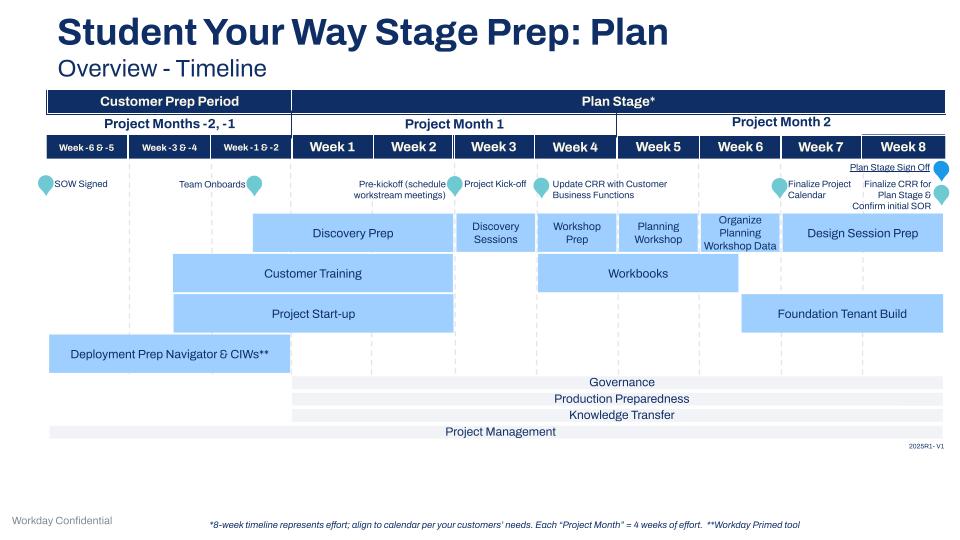
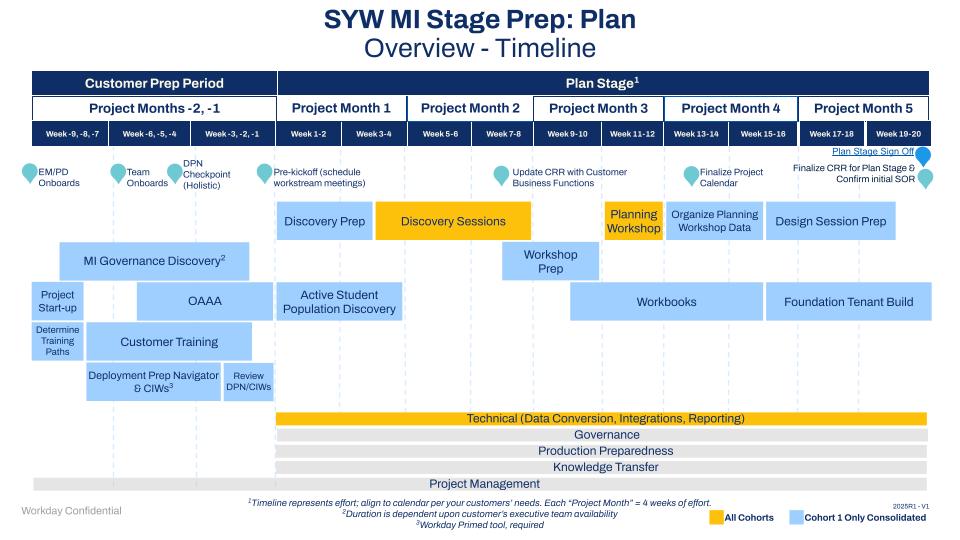
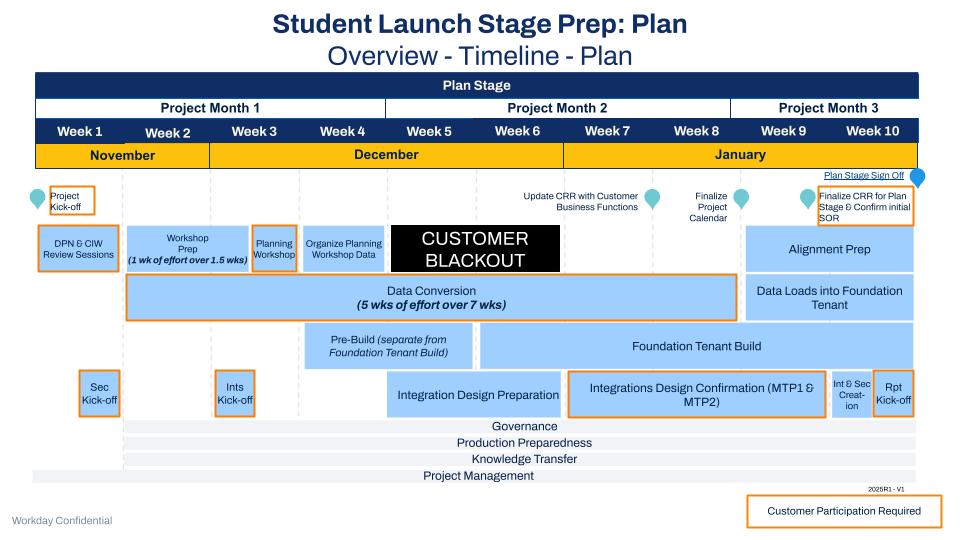
Plan Stage Deliverables
Risk Assessment
Workday Primed Only:
- EMs complete or update a Risk Assessment as they prepare for the project kickoff.
Artifacts
- Risk Assessment Document
Initiate Project Planning
EM activities required to initiate project planning:
- Build a project plan using the Project Plan Template.
- Schedule meetings using the Meeting Schedule toolkit.
- Create: Tenant Management Plan using the Tenant Management Plan.
- Prepare for and complete the Project kickoff Meeting.
- Review Audit Considerations.
- Create: Customer Testing Strategy and Plan using the Testing Toolkit.
- Distribute, complete, and submit the Student Volume Questionnaire.
- Present Mobile Overview to customer (refer to the Mobile Toolkit).
- Provide a Nightly Job Orchestration Overview presentation to customer.
Customers reference Performance Testing Types and Details for Customers.
Multi-Institution Deployment
If this is a multi-institution deployment the EM or PM will:
Review MI Sprint Overview presentation
Artifacts
- Project Plan Template
- Scope document
- Forecasting Tool
- Status Report Template
- Executive Steering Committee Template
- Tenant Management Plan
- Project Kickoff Presentation
- Customer Testing Strategy
- Customer Testing Plan
- Student Volume Questionnaire
- Mobile Overview Presentation
- Nightly Job Orchestration Overview Presentation
- Sprint Project Team Overview
Enterprise Solutions
Consultants use the Enterprise Solutions for Higher Education guides for specific areas of configuration for Student Your Way and Student Launch deployments.
Initiate Project Work Streams
EM initiates project work streams using these Toolkits:
- Toolkit - Academic Foundation
- Toolkit - Student Core
- Toolkit - Campus Engagement
- Toolkit - Student Recruiting
- Toolkit - Admissions
- Toolkit - Student Records and Academic Advising
- Toolkit - Financial Aid
- Toolkit - Student Financials
- Toolkit - Student Technical
- Platform-Student Touchpoint Toolkit
- Toolkit - Journey Paths (if in scope per SOW)
DPN and CIW Review Sessions (SL only)
Consultants Working runs sessions to verify the accuracy and understanding of customer-specific information in DPN and CIWs. The Project Team completes a review of all DPN/CIWs and prepares questions/discussion topics for these sessions. Note: This activity replaces Discovery Sessions in the Plan stage for SL projects.
Discovery Sessions (SYW Only)
Consultants will:
- Conduct Discovery Sessions.
- Guide discussion based on discovery questions.
- Lead discussion and define more requirements when relevant.
Customers will:
- Review and answer questions consistently and clearly so that consultants can configure the Foundation Tenant.
Artifacts
- Discovery Decision Guide
- Configurations Workbooks
Identity Management (IDM)
Consultants use the Identity Management (IDM) toolkit to:
- Define Identity Management (IDM) ownership at the institution to streamline the decision-making process.
- Clarify what Identity Management (IDM) consists of within Workday to create shared contexts for all future IDM discussions.
- Outline the necessary steps that the customer must take to support Workday configuration.
Artifacts
- IDM Agenda for Identity Management
- Identity Management Strategy Customer Overview
- IDM Current and Future State Discussion
Planning Workshop
In this 2 or three-day workshop, the extended project team comes together to develop a holistic plan for deployment of the Workday Student solution for the customer.
Preparation for the Workshop:
- Identify participants.
- EM or PM holds Workshop kick off and assigns preworkshop homework to the customer team (at least 2 weeks before the workshop).
- EM or PM works with customer to schedule a room (for in-person delivery) or Zoom meetings (for virtual delivery).
- EM or PM works with Facilitator to develop customer’s deployment timeline based on their completed homework and analyze/review internally with the project team before the Planning Workshop.
During the Planning Workshop:
Attend the multiday workshop (in person or remotely)
Participate in exercises to either finalize (SYW) or confirm (SL):
The customer’s deployment timeline.
The System of Record (SOR) of data during the transition from legacy systems to Workday.
The timing of functional work during the Worksets of the A&C Stage.
Outcomes of the Planning Workshop:
- Align on key information used in the Project Plan including the timeline and milestones.
- Define activities (a more detailed look at each functional area).
- Foster team alignment (stakeholder engagement and touchpoint alignment).
- Align on initial System of Record (SOR) decisions.
- Confirm (SL) or create (SYW) the project-specific Workset Playbook.
Artifacts
- Workset Playbook
- System of Record (SOR) - Initial
Security Kickoff
Configurable Security Lead will:
- Conduct: Configurable Security Kickoff.
- Present Configurable Security Overview.
- Conduct Security Strategy and Design Sessions.
- Complete Foundation Security Design Review.
- Assign customer next steps.
- Create: project-specific Configurable Security Tracker.
- Build customer configurable security (Foundation Tenant).
- Confirm Customer list for Proxy Access and WD adds proxy users to Foundation Tenant.
Artifact
Configurable Security Plan - initial
Data Conversion Kickoff
Student Your Way Deployments
If this is a Student Your Way deployment, Data Conversion Consultants will:
- Conduct Data Conversion Kickoff.
- Present Data Conversion Overview.
- Assign customer next steps.
- Create: project-specific Data Conversion Tracker.
- Establish depth of data conversion for Foundation Tenant.
- Conduct data-mapping sessions with customer Data Conversion Lead for Foundation Tenant.
- Finalize Data Conversion Approach.
- Load Foundation Tenant with all foundation data.
Student Launch Deployments
Student Launch Deployments complete during CPP.
If this is a Student Launch deployment, Data Conversion Consultants will:
- Conduct data-mapping sessions with customer Data Conversion Lead for Foundation Tenant.
- Load Foundation Tenant with all foundation data.
Integrations Kickoff
Integration Consultants will:
- Conduct Integration Kickoff.
- Present Integration Overview.
- Assign customer next steps.
- Create: project-specific Integration tracker.
- Be available for Planning Workshop sessions.
- Review Integration Design Document (IDD).
- Begin integration design work.
- Use Integration Design Document in the Integration Toolkit.
Artifact
- Integration Tracker - initial
- Integration Design Document (IDD)
Reporting Kick-off
Reporting Consultants will:
- Conduct Reporting Kickoff.
- Present Reporting Overview.
- Assign customer next steps.
- Create: project-specific Reports Tracker.
Customers reference Workday Student Reporting Guidance.
Artifact
Reports Tracker - initial
Customer Readiness Review
The Customer Readiness Review (CRR) assesses readiness for go-live by business function. The EM works with the customer and consultants to build the initial draft.
Artifact
- Customer Readiness Review (CRR) - Initial
Foundation Tenant Build
The Foundation Tenant is intended to:
- Provide a baseline configuration focused on a broad range of key business functions.
- Identify areas of complexity to address during the Architect and Configure stage.
- Serve as the 1st iteration of the customer's Workday Student tenant.
- Help the customer get oriented in Workday.
- Initiate the customer's hands-on use of Workday and help the team get used to reviewing and testing Workday early and often.
The Foundation Tenant starts from a copy of an existing Workday Production tenant and then the Consultants add more Student configuration based on:
- Configurations available for Student in WDSetup (ex. PACMAN integration)
- Enterprise Solutions
- Customer information gathered from Discovery Sessions (SYW) or completed DPN/CIWs (SL)
- Information from the Planning Workshop, publicly available information, and any other artifacts that the customer provided during the Plan stage.
Artifact
Foundation Tenant
Customer Training
Continue to complete training started during the Customer Prep Period (refer to Student Customer Training).
Alignment Preparation
Student Launch Deployment
If this is a Student Launch deployment, functional consultants will:
Validate the Foundation Tenant.
Prepare Student FAS Agendas and Presentations
Integration consultants meet with Workday functional consultants to prepare for FAS.
Customer Change Management
The customers own this part of the project.
The EM or PM provides these templates and tools to customers in support of their change management activities:
- Stakeholder Analysis and Plan Template.
- Recommended Change Management Activities By Stage.
- Change Management Guidance Kit.
The Customer initiates change management activities:
- Identify the scope for change management:
- Confirm resourcing for change management workstream.
- Identify and assess impacted stakeholders.
- Begin developing the initial change management strategy.
- The EM provides templates and resources to the customer to support their change management activities.
- Identify Change Champions and Agents:
- Identify Roles and Responsibilities.
- Work with the Executive Steering Committee.
- Define roles, participants, budget, and communication plan.
- Develop a change management timeline.
Artifacts
- Change Management Scope
- Change Champions and Agents
Stage Sign Off - Plan
See Stage Sign Off - Plan.
Artifacts
- Stage sign off document
Cross-Stage Work Streams
Project Management and Administration
The EM or PM will:
- Create and update deployment scorecard
- Initiate project resourcing
- Conduct Workday project team orientation
If deploying Journey Paths for Student, EM coordinate with the Cross-Functional Consultant to introduce using the Workday Journeys Toolkit.
Artifacts
- Workday project orientation presentation
Delivery Assurance / Deployment Review and Assessment*
*If in scope
Review below dependent on scope:
- FY23 Student Deployments - Delivery Assurance
- FY24 Student Deployments - Delivery Assurance (Modified DA)
- Conduct WSP Deployment Review and Assessment (DRA), if applicable.
The FY23 Delivery Assurance Overview for Workday Student Deployments / FY24 Delivery Assurance (Modified DA): Overview Presentations provides the Customer and Project Team with details about:
- How to execute delivery assurance.
- Who is responsible for what activities, and what roles are involved.
The DA Support team conducts the FY23 Delivery Assurance Review Template - Project Initiation / FY24 Delivery Assurance Review Template - Project Initiation on Partner Primed deployments:
- Ensures that the PM has prepared all of the required project planning documents for Workday-primed projects.
- Confirms that the deployment adheres to the Workday Methodology and has forecasted an achievable schedule, with appropriate resourcing based on scope and schedule for partner-primed projects.
The partner PM:
- Work with the Customer to complete the FY23 Delivery Assurance Review Template - Deployment Readiness / FY24 Delivery Assurance Review Template - Deployment Readiness checklist.
- Reviews it with the DRM (Deployment Review Manager).
- Helps the customer validate that they're performing the activities that allows them to successfully complete their Workday deployment.
Artifacts
- DA Overview for Student Deployments
- DA Review Template - Project Initiation
- Deployment Readiness Review Template
Knowledge Transfer
Functional Consultants plan knowledge transfer using Knowledge Transfer Tracker (KTT).
Artifact
Knowledge Transfer Tracker