Architect & Configure (Student)
The objectives of the Architect and Configure (A&C) stage of a deployment are for the customer and Workday project team members to find a common understanding of the customer's business needs, to analyze how they deploy Workday to meet those needs, and to prototype configuration.
During this stage, you review Workday concepts and functions, make design decisions (SYW) or align to the configuration in the foundation tenant (SL), and complete all application configurations in Workday. Execute data conversions for both configuration data (such as setup, organizations, and business processes) and operational data (such as workers and customers). Complete integration and report development, and prepare the tenant for the Test stage.
The A&C Stage is separated into Worksets, with iterative design (SYW) or foundation alignment (SL), configuration, and unit testing throughout each Workset.
Note: Content indicated for use on Sequential and Overlapping deployments applies to Student Your Way - Multi-Institution and Student Launch deployments unless indicated otherwise.
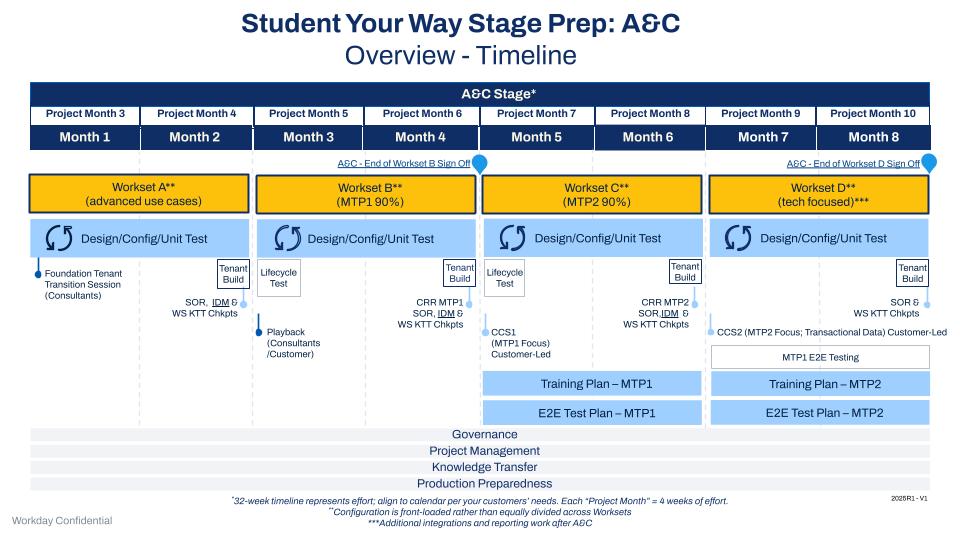
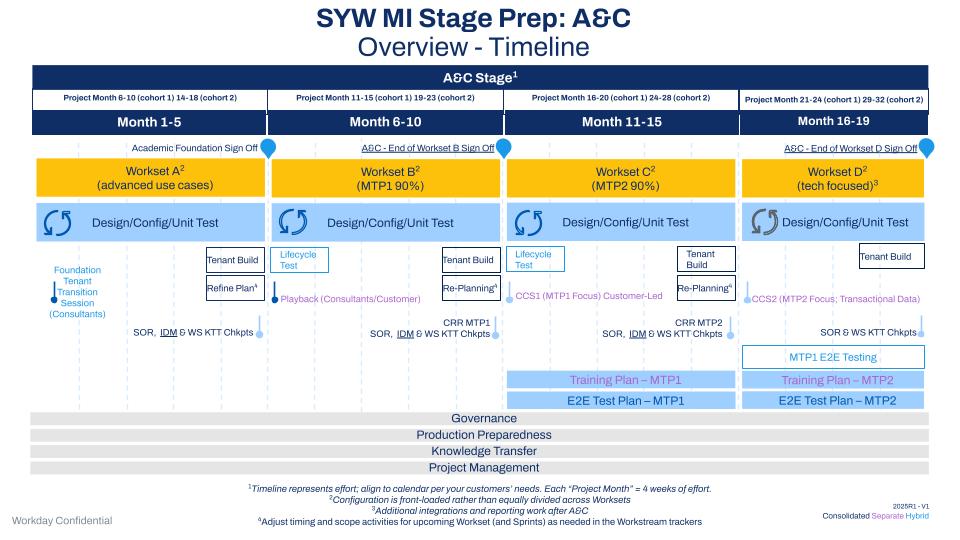
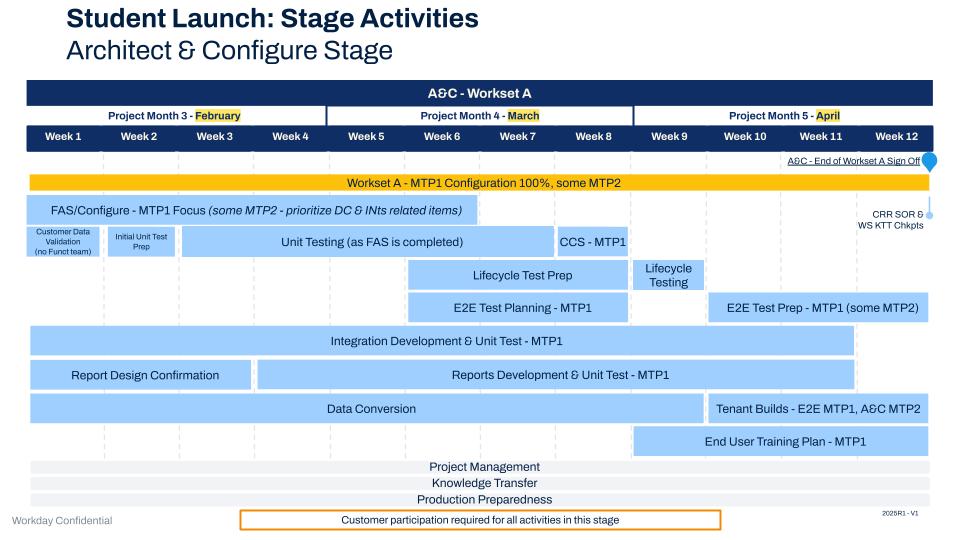
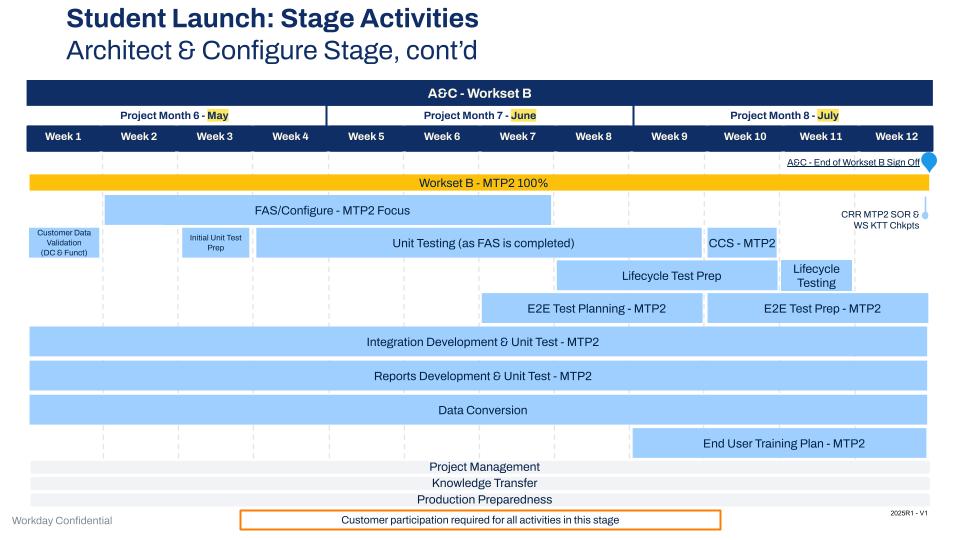
Architect and Configure Stage Timeline
The A&C Stage is separated into Worksets, with iterative design (SYW) or foundation alignment (SL), configuration, and unit testing throughout each Workset.
Architect & Configure Stage Deliverables
Workset Playbook
The Workset Playbook provides the breakdown for the work done during the A&C stage of the project. In addition to laying out the design, configuration and Unit Test activities, it identifies who is responsible and tracks completeness.
The development of the project’s Workset Playbook begins during the Planning Workshop (Plan stage), using a Workday-delivered template. The Engagement Manager (EM) and consultants are responsible for maintaining it.
Multi-Institution Deployment
If this is a multi-institution deployment, the EM or PM will:
- Adjust timing and scope activities for upcoming Workset (and Sprints) as needed in the Workstream trackers.
Artifacts
- Workset Playbook
Design Sessions and Design Documents
The design sessions are a series of workshops that take place as part of Worksets to review and finalize customer requirements.
Note that in Student Launch (SL) deployments, Foundation Alignment Sessions replace Design Sessions and Design Documents.
Student Your Way Deployments
If this is a Student Your Way deployment, functional and technical consultants will:
- Conduct Design Sessions.
- Introduce Workday product, functionality, and terminology.
- Demonstrate relevant Workday functionality.
- Dive deeper into design decision questions introduced during Discovery Sessions to gather a more detailed understanding of customer requirements.
- Review integrations and report inventory list to determine the build priority for each item and identify who will own the creation of each item.
- Collect completed deployment workbooks for configurations, data conversions, design decisions, and business requirements.
- Collect configuration workbooks from the customer.
- Review configuration workbooks to ensure that the configuration meets the customer's requirements.
Artifacts
- Discovery Decision Guides
- Product Overview Presentations
- Configuration Workbooks
- Integrations Tracker
- Reporting Tracker
- Integrations Test Plan
- Mobile Overview Presentation
Foundation Alignment Sessions
Student Launch Deployment
If this is a Student Launch deployment, consultants will:
- Lead Foundation Alignment Sessions (FAS) to introduce the customer to Workday recommended configurations, using the Overview Presentations.
- Gather requirements for a configuration that is a) collected in the CIW but needs further discussion, or b) a new concept best demonstrated and discussed in a face-to-face session.
- Conduct in Workset A for MTP1 configuration and in Workset B for MTP2 configuration.
Unit and Lifecycle Test
The Customer is responsible for creating customer-specific test scenarios for Unit and Lifecycle Testing by adopting the Testing Template from the Testing Toolkit and creating Mobile Test scenarios using the Mobile Toolkit. Functional Consultants are expected to do a preliminary review of tests to remove out-of-scope items and review customer-completed scenarios to advise on missing items.
Unit Testing is stand-alone testing of configuration within a functional area. We test individual tasks and business functions without looking downstream or upstream. We also test reports and integrations in a stand-alone fashion as they're completed.
- The customer completes Unit Testing with support from Workday or the partner project team as configuration becomes ready to test.
- This testing occurs during the A&C stage as part of each workset, through a cycle of designing or aligning, configuring, and Unit Testing to support the objectives in each workset.
Lifecycle testing is unique to Student deployments. Customers execute Lifecycle testing, with support from Workday or the partner.
- Lifecycle testing occurs during the A&C stage. It incorporates all configuration completed up to that point.
- Lifecycle testing is holistic, meaning it includes functionality for all business function milestones, not just functionality to support an individual move to Production.
- Scenarios include cross-functional items that become more robust as time goes on. You might also test converted data, integrations, security, and reports as they become available.
Artifacts
- Customer Confirmation Session Schedule
- Unit and Lifecycle Test Scenarios
- Mobile Test Scenarios
A&C Tenant Builds
A&C Tenant Builds are tenant builds based on the Foundation Tenant and the output of each workset in preparation for Customer Confirmation Sessions and Lifecycle Testing. The tenant builds take place at the end of worksets A, B, and C for SYW deployments. Note that Student Launch deployments only have an A&C tenant built at the end of Workset A.
Functional and Technical Consultants will:
- Compile build checklists:
- Configuration (including manual steps)
- Operational (Example: legacy system data such as courses, students, and registrations)
- Integrations
- Reports
- Build tenant from checklists.
- Validate tenant build by determining that information has moved into Workday completely and accurately.
- Perform smoke testing to ensure that the tenant build is complete by:
- Executing short tests to ensure that all key functional areas are working correctly.
- Confirming the customer security team validates security provisioning is in place for testers.
Artifacts
- Tenant Build Checklist
- Configuration Workbooks
- Operational Data Workbooks
- Integrations
- Reports
- A&C Tenants
Customer Confirmation Sessions
Customer Confirmation Sessions (with follow-up discussions) confirm the design using the most recent tenant build. These are led by the customer to validate decisions and assist in configuration finalization.
- Conduct Customer Confirmation Sessions.
- Update A&C tenant.
- Update configuration workbooks if needed.
- Update Design Decision Guides.
Artifacts
- Customer Confirmation Sessions Presentation
- Updated Configuration Tenant
- Updated configuration Workbooks
- Updated Design Decision Guide
- Updated Issues Log
- Updated Test Log
Customer Readiness Reviews
During the Customer Readiness Review (CRR), consultants work with the customer to ensure business functions and the outcomes of Design Sessions or Foundation Alignment Sessions are aligned in preparation for go-live. The EM initiates 2 CRRs during the A&C stage to verify readiness for End to End (E2E) testing for SYW and SL projects, and User Readiness Review Testing (URR) for SYW projects only.
- Use and update the CRR in alignment with design sessions.
- Confirm all Move to Production 1 (MTP1) business functions are ready for E2E testing (SYW and SL) and URR (SYW).
- Confirm all Move to Production 2 (MTP2) business functions ready for E2E testing.
Artifact
- Customer Readiness Review (CRR) Template
Identity Management (IDM)
Consultants have follow-up discussions at designated points in the project to address any IDM challenges:
- Review new (historical, new admits, workers) vs existing population of Active Students
- Revise, as necessary.
Artifacts
- IDM Agenda for Identity Management
- IDM Current and Future State Discussion
A&C Sign-off - End of Workset B
Artifact
- Stage sign off document
Data Conversion
- Review the scope for the Workset at the beginning of each Workset.
- Create a Tenant Build Checklist and schedule tenant build meetings towards the end of each Workset.
- Finalize system of record plan sheet, and conduct mapping sessions for new conversions at the beginning of Workset B.
- Review conversions from previous Workset at the beginning of remaining Worksets. For SL this is Workset B and for SYW this is Worksets B, C, and D.
- Meet with functional leads to determine functional dependencies for each Workset.
- Update Data Conversion Tracker.
Start and refine tenant build plans during this stage. Work with the Data Conversion team to plan and practice migrations and tenant builds for the final Production move.
Artifact
- Data Conversion Tracker
Reports Build and Unit Test
Customer Report Writers create and unit test reports that are in scope that are assigned to the customer to complete (refer to Workday Student Reporting Guidance):
- Conduct an internal reporting strategy/approach meeting.
- Document reporting needs (support by FCs, RC).
- Ensure alignments on reports build ownership (with RC).
The Reporting Consultant creates and unit tests reports that are in scope and that the customer has assigned to Workday to complete.
- Conduct Reporting Discovery Sessions.
- Design MTP1 and MTP2 Reports.
- Review and Prioritize Report Inventory and Prioritization with Customers.
- Conduct Functional Workshops.
- Conduct Fit/Gap Analysis.
- Identify Custom Reports and Dashboards.
- Discuss Report Governance.
- Create: Custom Report/Dashboard specification.
- Develop Unit Test MTP1 and MTP2 Reports.
- Develop Custom Reports and Dashboards.
- Unit Test Custom Reports and Dashboards.
- Ensure that Report and Dashboard scenarios are included in E2E, URR, and Mock Semester.
Artifacts
- Priority Reports List
- Report Ownership List
- Completed Reports
Integrations Build and Unit Test
Build and develop the integrations that you defined as in scope during the discovery sessions, Statement of Work (SOW), and design sessions.
Integration Consultants will:
- Conduct Integration Discovery/Design (MTP1 and MTP2).
- Host Integration Design Workshop.
- Develop Integration Design Documents (IDDs).
- Align integration work with Workset Playbook dependencies.
- Update Integration Tracker.
- Develop and unit test Workday owned integrations (MTP1 and MTP2).
- Plan for Nightly Job Orchestrations (MTP1 and MTP2).
Customer will:
- Participate in integration design sessions.
- Engage required SMEs to aid consultant in completion of IDDs.
- Sign off on IDDs.
- Provide additional information on integrations.
- Develop and unit test customer owned integrations (MTP1 and MTP2).
Artifacts
- Priority Integrations List
- Integration Ownership List (Integration Worksheet)
- Developed XLST Code
- Developed Studio Integration Code
- Completed Integrations
- Integration Tracker
End-User Training Plan
The customer is responsible for creating their own training strategy that defines who to train, how to train them, and when the training will take place. In addition, they document roles, responsibilities, and training materials.
Customer will:
- Determine if they purchased the Adoption Kit (employee and manager self-service tasks).
- Review SOW for contractual training obligations.
- Assess the training needs.
- Determine the worker population to be trained.
- Establish training milestones.
- Determine training delivery methods.
- Define roles and responsibilities.
- Determine requirements for training tenant.
Artifact
- End-User Training Plan
Journey Paths for Student (if in scope per SOW)
Functional Consultants will:
- Use the Workday Journeys Toolkit to implement Journey Paths for Student.
End to End Test and User Readiness Review Preparation
Functional Consultants will:
- Complete a preliminary review of end to end testing scenarios to remove out-of-scope items.
- Review customer-completed scenarios to advise on missing items.
The Customer is responsible for:
Preparing for End to End (E2E) testing by adopting the Testing Template and creating customer-specific test scenarios to support E2E Testing. This work is completed in the A&C stage.
Technical Consultant and Customer will:
- Develop Nightly Job Orchestrations scenarios to test MTP1 and MTP2.
Artifact
- End to End (E2E) Test Scenarios in the Testing Template
End to End Tenant Build
The End to End (E2E) Tenant Build captures output of the prior builds to support E2E testing focused on validating configurations, business processes, integrations, data conversation, and reporting validating Production-like processing. The E2E tenant builds during A&C take place at the end of Worksets C and D for SYW, and the end of Workset A for SL. The customer team is responsible for validating the accuracy of the tenant build.
Functional and Technical Consultants will:
- Compile build checklists:
- Configuration (including manual steps)
- Operational (Example: legacy system data such as workers, customers, and invoices)
- Integrations
- Reports
- Build tenant from checklists.
- Validate tenant build.
- Determine that information has moved into Workday completely and accurately.
- Perform smoke testing.
- Ensure that the tenant build is complete by executing short tests by the consulting team to ensure that all key functional areas are working correctly. Customer security team validates security provisioning is in place for testers.
- Review the DA template during configuration to ensure that all requirements have been addressed.
Artifacts
- Tenant Build Checklist
- Configuration Workbooks
- Operational Data Workbooks
- Integration Tracker
- Reporting Tracker
- End to End Tenant
A&C Sign-off - End of Workset D (SYW) or Workset B (SL)
Artifact
- Stage sign off document
Cross-Stage Work Streams
Project Management and Administration
The Workday EM or Partner PM completes ongoing project management and administrative activities, with the Customer PM as needed:
- Process change orders (as needed).
- If this is a Multi-Institution deployment, follow the Change Control Management Toolkit for Multi-Institution Deployments
- Maintain and regularly review the Risks, Action Items, Issues, Decisions, Questions (RAIDQ) log.
- Finalize Change Management Strategy.
- Finalize Change Impact List and Draft End-User Communication Materials.
- Maintain the weekly status report and Executive Steering Committee report.
- Maintain the project plan.
- Update the tenant management plan as needed.
- Update the resource plan as needed.
- Maintain the forecast.
- Update the project financials monthly.
Multi-Institution Deployment
If this is a Multi-Institution deployment:
- Complete monthly Pace Check-in.
- Formalize Change Control Management from the start of the End-to-End Tenant Build through Production.
Artifacts
- Change order (if needed)
- Decision log
- Deployment Scorecard
- Status report
- Executive steering committee template
- Project plan
- Issues/risk log
- Tenant management plan
- Resource plan
- Forecast/financials document
Delivery Assurance / Deployment Review and Assessment*
*If in scope
Review below dependent on scope:
FY23 Student Deployments - Delivery Assurance (Legacy DA)
FY24 Student Deployments - Delivery Assurance (Modified DA)
Conduct WSP Deployment Review and Assessment (DRA), if applicable.
The partner PM:
- Works with the customer to complete the Deployment Readiness checklist.
- Reviews it with the DRM (Deployment Review Manager).
- Helps the customer validate that they’re performing the activities that allow them to successfully complete their Workday deployment.
The Academic Foundation Org Review occurs early in the A&C Stage because it’s critical to ensure that the foundational elements of the Student configuration are sound and properly connected with previous HCM and FIN configuration.
For FY23 deployments, each product area has 2 Configuration Prototype Reviews during the A&C stage that evaluates the design and configuration of the tenant.Note: For FY24 deployments, there are no Configuration Prototype Reviews during the A&C stage.
The Prism Design Review is tailored to analyze each Prism use case in scope.
The Integration Approach Review ensures that all partner-built and Workday-built integrations are addressed according to best practices. This is a consolidated review of all such integrations and their plans for execution.
Artifacts
- Deployment Readiness Review Template
- DA Review Template - Academic Foundation
- Configuration Review Template - Prism Analytics
- DA Review Template - Integrations
- Student Product Templates
Knowledge Transfer
Functional Consultants will:
- Conduct Knowledge Transfer sessions during each Workset.
The Workday EM or Partner PM will:
- Confirm that KTT Workset Checkpoints are completed.
Artifact
- Knowledge transfer Tracker
Support Model and Governance
Artifact