Test (Student)
The Test stage of a Workday deployment ensures that Workday meets your needs. Each test effort has a different set of conditions and a different purpose. The test must meet the agreed-upon exit criteria for each test effort to move forward toward go-live. Each of these test efforts is described below.
Note: Content indicated for use on Sequential and Overlapping deployments applies to Student Your Way - Multi-Institution and Student Launch deployments unless indicated otherwise.
Test Stage Timeline
This timeline overview shows the events and activities in the Test stage.
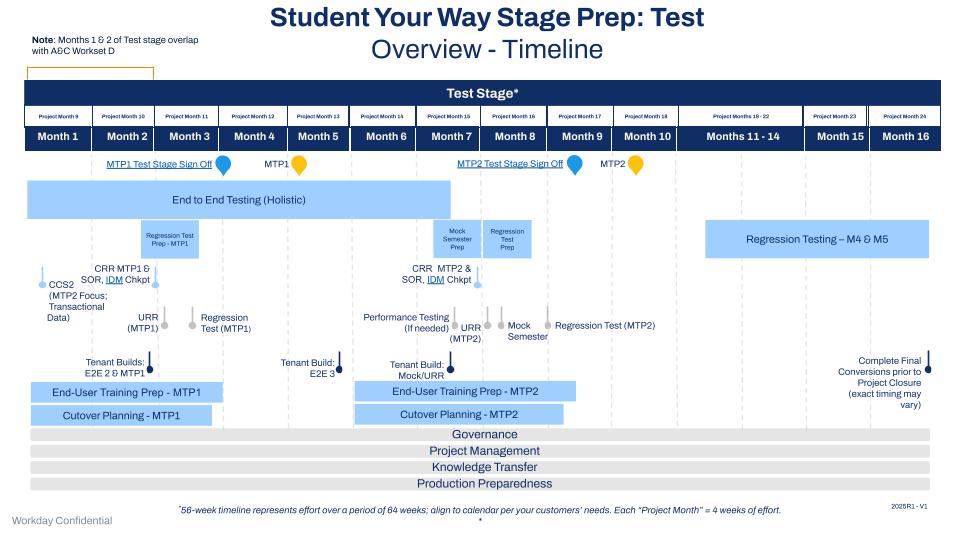
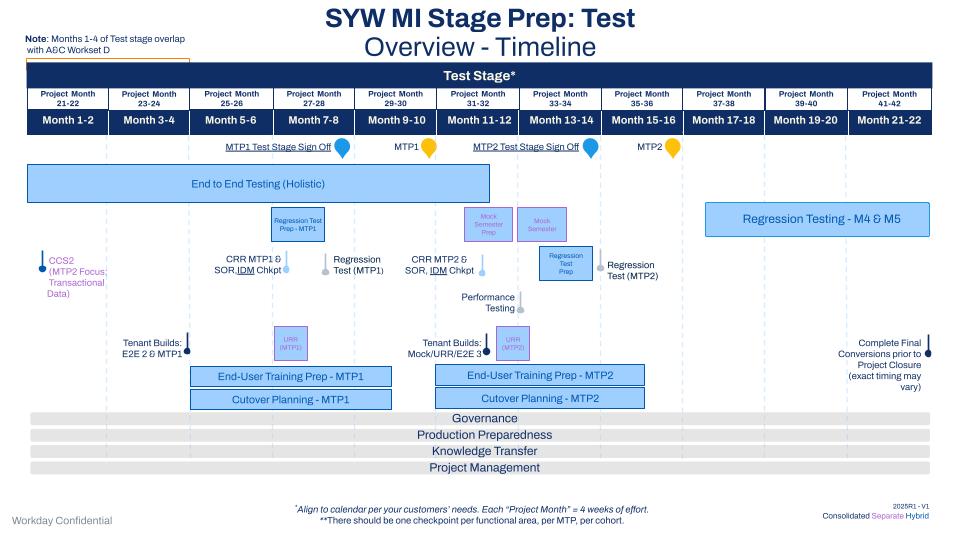
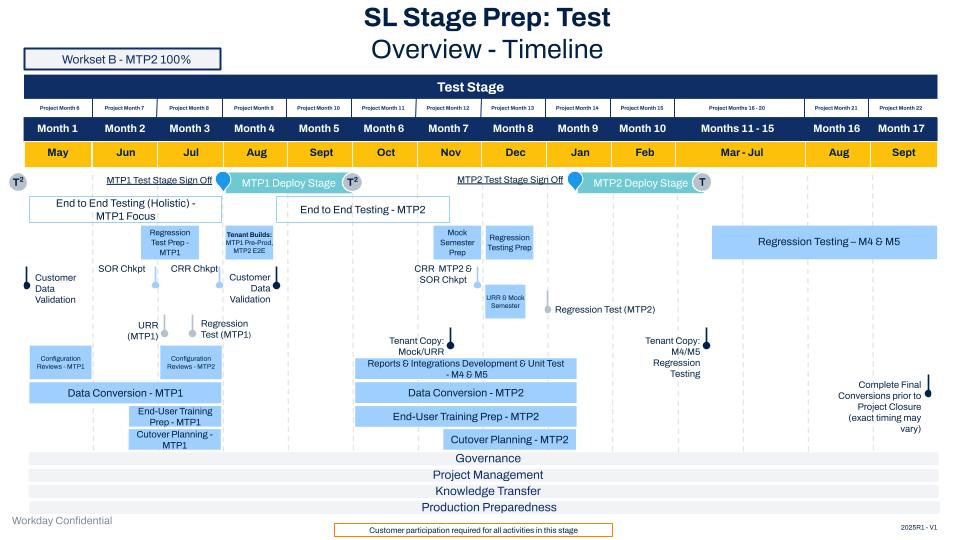
Test Stage Deliverables
End to End Testing
End to End (E2E) testing is holistic testing that links business processes, tasks, data, integrations, security, reports, catch-up transactions, and anything else needed in your cutover. By the time the customer enters the test stage, they must include final in-scope converted data, integrations, security, and reports in E2E testing. This testing is cross-functional:
- E2E focuses on testing the flow of processes across the full lifecycle of a student, period, year, applicant, and record.
- Functional Consultants validate the security configuration.
- As the customer prepares for the first Move to Production (MTP1), they should E2E test configuration, integrations, and that go live as part of MTP1. They should also test downstream impacts that will go live and into Production as part of MTP1.
- Before moving to the deployed stage for MTP1, customers should be able to take a sample set of students from application to graduation successfully, and accomplish everything that takes place during a student lifecycle.
- E2E testing will also take place after MTP1 to support MTP2 and will focus on configuration, integrations, reports, and that go live and into Production as part of MTP2.
- The customer is responsible for executing and managing E2E testing, with Workday’s or a partner’s support for issue resolution.
- Incorporate Mobile test scenarios into E2E testing.
Artifacts
- End to End (E2E) Test Plan
- E2E Test Scenarios in the Testing Template
- E2E Test Schedule in the Testing Template
- Testing Issues Log
- Mobile Toolkit
- Cutover Plan
Data Conversion
Data Conversions Consultants will:
- Create: Tenant Build Checklist and schedule tenant build meetings in preparation for each build.
- Review strategy for catch up transactions.
- Prepare catch-up conversions.
Artifact
- Tenant Build Checklist
Customer Readiness Reviews
For Student Your Way and SYW Multi-Institution projects, account for all business functions during unit, lifecycle, or E2E Testing. The customer Engagement Manager (EM) initiates 2 CRRs during the Test Stage to verify readiness for URR and MTP1 and MTP2.
- CRR Checkpoint - MTP1: Confirm that all MTP1 business functions are ready for URR
- CRR Checkpoint - MTP2: Confirm that all MTP2 business functions are ready for URR
Artifact
- Updated Customer Readiness Review
End to End Tenant Build (2)
Another testing tenant builds to support continued E2E Testing:
- Use these tenants, or copies of them, to support User Readiness Review (URR), Regression Testing, and Mock Semester.
- E2E Tenant Builds during the Test stage take place after MTP1 (SYW and SL), and after the Business Function Milestone Uptake before the 2nd Move to Production (MTP2) (SYW only).
Artifacts
- Build Checklists
- Configuration Workbooks
- Operational Data Workbooks (legacy system data such as workers, customers, and invoices)
- Integration Tracker
- Reporting Tracker
- Testing Tenants
Identity Management (IDM)
Consultants have follow-up discussions at designated points in the project to address any IDM challenges:
For MTP 1, consultants will:
- Review new (historical, new admits, workers) vs existing population of Active Students
- Revise, as necessary.
For MTP 2, consultants will
- Finalize MTP2 population and complete deduplication with sufficient lead time.
- Set clear expectations for the 1st catch-up period.
Artifacts
- IDM Agenda for Identity Management
- IDM Current and Future State Discussion
Regression Testing
There are 3 different kinds of regression testing.
- Like an HCM or FIN deployment, the 1st type of regression test in a Student deployment involves uptaking new functionality from the feature release based on customer needs and regression testing to ensure that feature releases haven’t impacted existing configuration in unexpected ways.
- You might need to perform extra regression testing following weekly patches, especially when new functionality is released that supports your institution’s business needs.
- In the 2nd type of regression test, which is unique to Student deployments, test only the configuration, data, integrations, security, and reports that you’re deploying during the current MTP in a tenant that only has the functionality for the current MTP.
- Most testing is holistic. It’s important to test that the functionality in an MTP works correctly when isolated from other functionality before you enter the Deployed stage for that MTP.
- Test E2E scenarios with only the functionality in this MTP. E2E regression testing is the last test that you run before an MTP.
- The 3rd type of regression testing, also unique to Student, is to prepare for upcoming business function milestones.
- Example: if an upcoming milestone involves student bills, complete a test run of student bills in a copy of Production.
In all cases, the customer is responsible for regression testing.
Artifacts
- Regression Test Plan
- Regression Test Scenarios
- Testing Issues Log
Performance Testing (if applicable)
Performance Testing Types and Details for Customers
The EM or Project Manager (PM) will:
- Complete Scheduling requirements on the Systems Health Dashboard and alert your PRM through the Production Readiness Case.
- Attach the completed Student Performance Testing template to the Production Readiness Case. Refer to the Performance Testing Template FAQ page for any questions while filling out this document.
- Confirm Full Schedule Testing dates with PRM to align the appropriate project resources.
- Review Full Schedule Testing and Baseline Testing results with PRS, and if needed to the Product Team.
- Review any notable go-live performance cases with PRM.
The PRM and Services Performance Analyst will:
- Review the performance testing analysis with the EM or PM.
User Readiness Review
User Readiness Review (URR) is an opportunity for select end users to try out the Workday system and associated training materials/documentation so that the training team can identify support needs for a successful go live.
- The team for URR should include staff and faculty who will be using Workday as part of their day-to-day jobs after the MTP.
- URR is MTP-specific. Example: in preparation for MTP1, URR only includes scenarios that will be in Production after MTP1.
- Use a subset of unit, lifecycle, and E2E testing scenarios that are representative of daily work that the team will be responsible for after go-live.
- Train the URR team using drafts of the end-user training materials that you plan to use during training in the Deployed stage. URR also acts as a great change management exercise for the customer.
- The customer owns URR fully and should take the lead on issue resolution during this activity.
- We recommend completing URR before each MTP.
- Complete E2E testing to support an MTP before conducting URR for that MTP.
- Incorporate mobile test scenarios into URR.
Artifacts
- URR Plan
- Tenant - Prepared for URR
- URR Scenarios
- URR Schedule
- Testing Issues Log
- Mobile Toolkit
Mock Semester
Mock Semester is an opportunity to practice business functions in Workday with students and administrators. Mock Semester is designed to simulate activities occurring across the university within a given semester.
- It provides the opportunity for students to move through scenarios that would normally occur across the course of several days or weeks.
- By having multiple user groups participating at once, students can seamlessly move through a scenario and faculty and staff can interact with the student and perform normal business functions in Workday to prepare for when Workday is live.
- The customer owns Mock Semester. Workday or the partner supports them closely during this testing cycle.
- E2E testing must be complete before conducting a Mock Semester, as should UAT, if applicable.
- Train staff and faculty participants before Mock Semester. You can provide them with a Preview of the quick reference guides at this point.
- There’s no need to provide formal training to students.
- Use the Mock Semester Toolkit.
- Incorporate Mobile test scenarios into Mock Semester.
Artifacts
- Mock Semester Toolkit
- Testing Issues Log
- Mobile Toolkit
Cutover Planning
During cutover planning, define the plan for the Production cutover from legacy to Workday, prepare for Production support and prepare the go-live checklist.
The EM or PM will:
- Edit the Cutover Plan in the Cutover Toolkit to make it customer-specific.
- Ensure that the customer understands the purpose and ownership of the cutover plan.
- Work with the customer to review and update the cutover plan to ensure that it's complete.
- Create a Move to Production support case.
- Prepare and obtain approval for the Student Go Live Checklist and Authorization.
Artifacts
- Cutover Plan
- Move to Production Support Case
- Student Go Live Checklist and Authorization
End-User Training Materials
The customer will:
- Develop end-user training material tailored to their specific Workday architecture and business processes.
- Establish and outline training schedules in the training strategy.
- Join the Change Management User Group.
Artifacts
- End-User Training Materials
- Training Schedule
Reports Build and Unit Test
Reporting Consultants will:
- Develop and unit test Milestone 4 and 5 reports
Integrations Build and Unit Test
Integration Consultants:
- Develop and unit test Milestone 4 and 5 integrations
- Develop Nightly Job Orchestrations Plan (MTP1 and MTP2).
Stage Sign-Off - Test
Artifact
- Stage Signs off - Test
Cross-Stage Work Streams
Project Management and Administration
The Workday EM or Partner PM completes ongoing project management and administrative activities, with the Customer PM, as needed:
- Maintain project plan.
- Maintain a RAIDQ log.
- Update tenant management plan as needed.
- Update resource plan as needed.
- Update project financials monthly.
Multi-Institution Deployment
If this is a Multi-Institution deployment:
- Complete monthly Pace Check-in.
Artifacts
- Project Plan
- RAIDQ Log
- Tenant Management Plan
- Financials Document
- Resource Plan
Delivery Assurance / Deployment Review & Assessment*
*If in scope
Review below dependent on scope:
FY23 Student Deployments - Delivery Assurance (Legacy DA)
FY24 Student Deployments - Delivery Assurance (Modified DA)
- Conduct WSP Deployment Review & Assessment (DRA), if applicable.
The Deployment Readiness Checkpoints in the Test stage align with each MTP. The Cutover Plan Reviews occur before the MTPs. These checkpoints ensure all the important areas are addressed for a successful cutover to Production and roll-out of the new Workday system.
If the Project Initiation Review was yellow or red for partner-primed projects, the Deployment Review Manager (DRM) performs a Testing Check In at the end of the Test stage to confirm that the project is on course and that the issues and risks that were documented during the Project Initiation Checkpoint are resolved and validated during the test stage.
For FY24 deployments, the design and configuration for each Student product is reviewed in the Pre-Production tenant for each MTP during the Configuration Reviews. For Multi-Institution deployments, there should be 1 checkpoint per functional area, per MTP, per cohort. Note: For FY23 deployments, the Configuration Final Reviews take place during the Deployed Stage.
The Prism Build Review examines the Prism configuration to determine if the build follows the design that was established earlier in the deployment.
The Reporting Compliance Review identifies potential performance risks and items that don’t adhere to the best practices. The DAX tool must still be run and errors resolved for Reporting.
Due to the unique nature of integration requirements, there are 2 Integration Compliance Build Reviews (one per each MTP) to ensure that the partner-built and Workday-built integrations are addressed according to best practices. The Workday Delivery Assurance (DA) support team conducts this review. The DA consultant then reviews any integrations that need extra attention. Note: There's no longer formal Integration Build Review checkpoints for FY24 Delivery Assurance. The DART tool must still be run and errors resolved for integrations.
Artifacts
- Deployment Readiness Review Template
- DA Review Template - Cutover Plan
- Configuration Review Template - Prism Analytics
- DA Review Template - Reporting
- DA Review Template - Integrations
Knowledge Transfer
Functional Consultants will:
- Conduct Knowledge Transfer for Functional areas within the testing stage.
Reporting Consultants will:
- Conduct knowledge transfer MTP1 and MTP2 reports
Integration Consultants will:
Conduct any remaining knowledge transfer MTP1 and MTP2 integrations
Configurable Security Leads will:
Conduct any remaining knowledge transfer MTP1 and MTP2 configurable security
Customers will:
Drive through configuration in E2E testing and Mock Semester to identify gaps that require additional Knowledge Transfer
Artifact
- Knowledge Transfer Tracker
Production Preparedness
The customer should register for the following Webinar, to review:
Readiness for Go-Live and Ongoing Success
Topics:
- Workday Support Team and Governance and Key Activities
- Goals for Deploy Phase
- Support Evolution and Community
- Understanding Workday Releases
- Rolling Adoption