Deploy (Student)
Once you’ve met all of the exit criteria for the Test stage for each Move to Production (MTP), you’re ready to move on to the Deployed stage, where you go live on Workday in a Production environment using all of the features and integrations you configured and tested during previous stages. Student projects typically have 2 formal Deploy stages, one each to support MTP1 and MTP2. Certain Deploy stage activities that occur to support project closure only take place at the end of the project, as you approach your final Business Function Milestone. Note also that for each uptake of a Business Function Milestone, you might need to deploy extra security in Production.
Note: Content indicated for use on Sequential and Overlapping deployments applies to Student Your Way - Multi-Institution and Student Launch deployments unless indicated otherwise.
Deploy Stage Timeline
This timeline overview shows the events and activities in the Deployed stage.
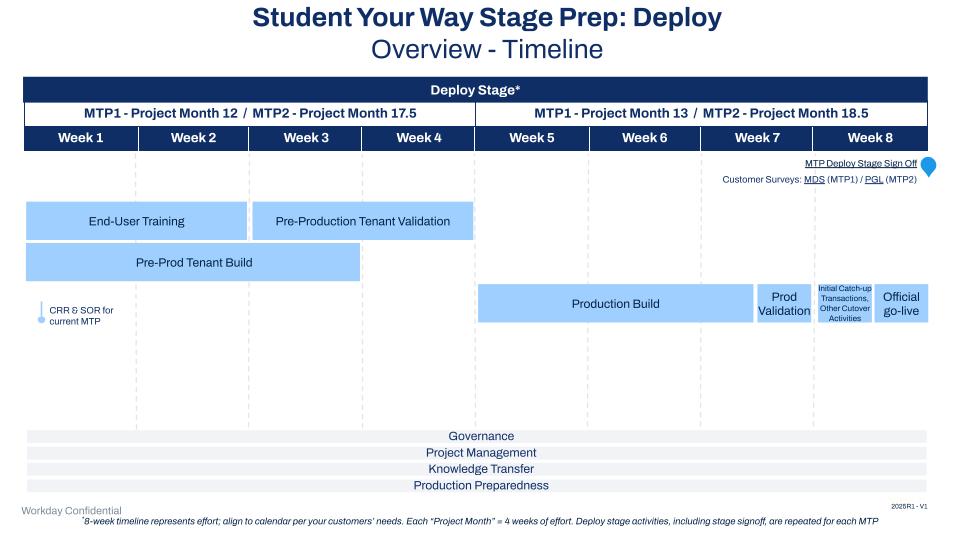
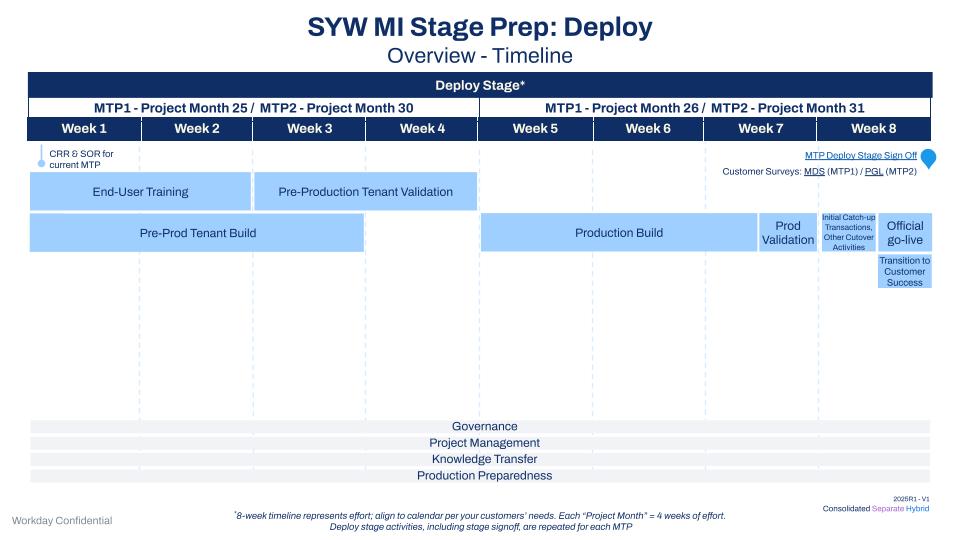
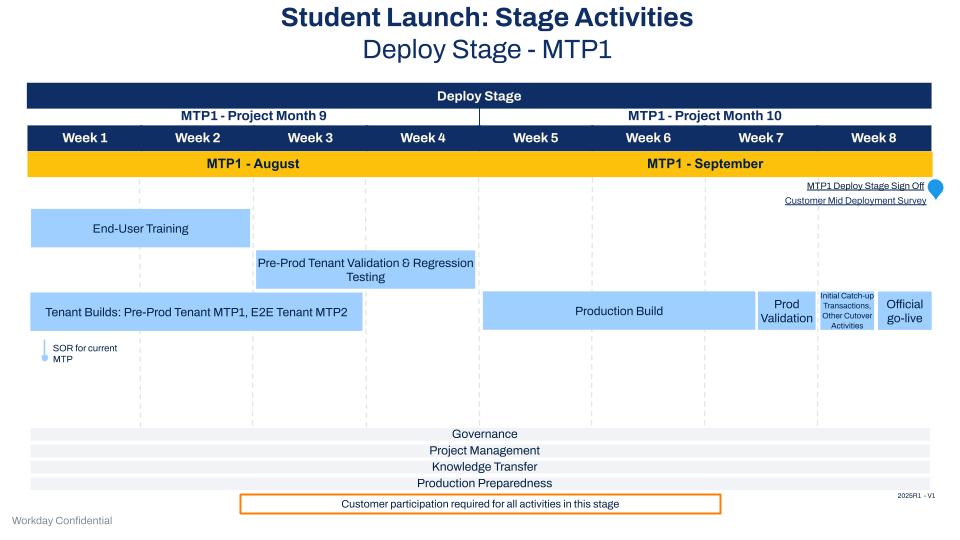
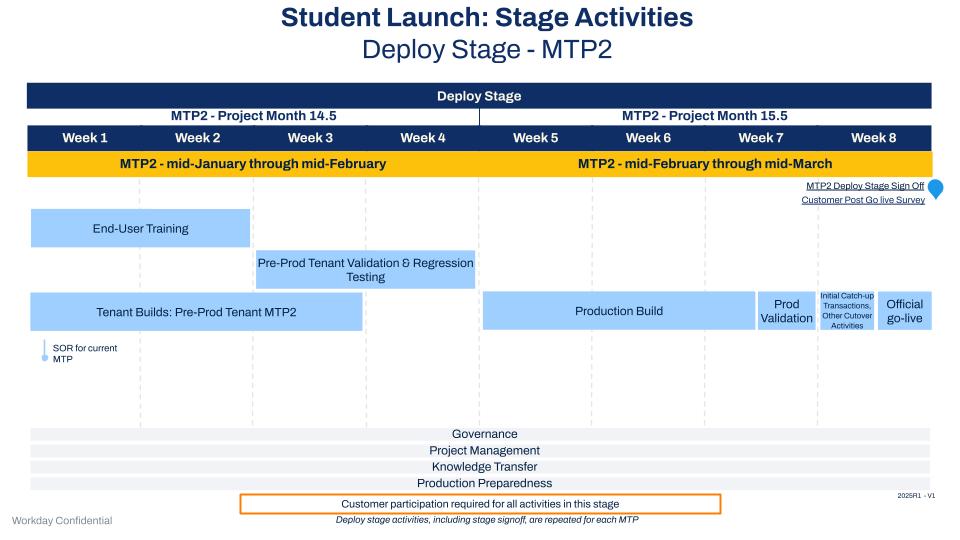
Deploy Stage Deliverables
Customer Readiness Review (CRR)
The Workday Engagement Manager (EM) or Partner Project Manager (PM), and Customer are aligned that all business functions are ready for Production.
- CRR Checkpoint - MTP1: Confirm that all MTP1 business functions are ready for Production
- CRR Checkpoint - MTP2: Confirm that all MTP2 business functions are ready for Production
Artifact
- Customer Readiness Review (CRR)
End-User Training
The customer is responsible for executing the training strategy defined in the Architect and Configures stage (A&C). Ensure that appropriate policies and procedures are updated.
- Confirm that the customer is training end users.
Artifact
- End-User Training Plan
Pre-Production Tenant Build
Complete final configuration and full data conversion loads. The customer reviews and approves all data converted into the pre-Production tenant. Perform any manual configuration changes.
Data Conversion Consultants create a Tenant Build Checklist and schedule tenant build meetings in preparation for build
Artifacts
- Build Checklists
- Configuration Workbooks
- Operational Data Workbooks (legacy system data such as students, courses, registrations, and so on)
- Integration Tracker
- Reporting Tracker
Production Tenant Build
The integrity and validity of the data in the Production tenant is critical. Once you’re live on Workday, the data housed in the Production tenant becomes your system of record, replacing the legacy system.
Data Conversion Consultants create a Tenant Build Checklist and schedule tenant build meetings in preparation for build.
Artifacts
- Build Checklists
- Configuration Workbooks
- Operational Data Workbooks (legacy system data such as students, courses, registrations, and so on)
- Integration Tracker
- Reporting Tracker
- Production Tenant
Stage Sign-Off: Deploy
Artifact
- Stage Signs off Document
Go-Live Sign Off
The customer approves and signs off on go-live tasks, as detailed in the go-live checklist. The Workday or partner implementation team must:
- Transition to Production services
- Prepare and obtain the necessary approvals for the Stage Sign Off Requirements and Templates
- Validate that all Delivery Assurance (DA) checkpoints are completed
- Prepare MTP configuration, data, integrations, reports, and security
Artifacts
- Student Go-Live Checklist and Authorization Document
- Service Care Case or MTP
- Go-Live Announcement (final MTP only)
- Production Tenant
- Knowledge Transfer Tracker
Post-MTP Data Conversion
Sync all transactions that occur in the legacy system after each MTP to Workday.
- Execute the cutover plan.
- Load the remaining conversions into the Production tenant.
Artifact
Production Tenant Loaded with Post-MTP2 Transactions
Production Support
The Workday EM or Partner PM provides functional consulting support to the customer as needed during a specified period following go-live and:
- Executes Production Support
- Complete Delivery to Customer Success Transition templates
- Functional Consultants (SYW deployments only) will provide Ad Hoc Consulting support for no more than 6 weeks after Milestone 1-4 uptake and 4 weeks after last Milestone uptake.
- Integration Consultants support the customer through successful Production runs or until the Customer is transitioned to Workday Customer Support, whichever comes first.
- Data Conversion Consultants will provide Ad Hoc Consulting support for no more than 4 weeks after the final conversion milestone.
- Reporting Consultants support the customer through 2 successful Production runs or until the Customer is transitioned to Workday Customer Support, whichever comes first.
Artifacts
- Closed Issues Log
- Support Request Log
- Go Forward Plan
- Delivery to Customer Success Transition
Cross-Stage Work Streams
Project Management and Administration
The Workday EM or Partner PM completes the final project management and administrative activities, with the Customer PM as needed:
- Complete the project plan.
- Convert any remaining ISE cases to Ideas, and close all JIRAs.
- Close Risks, Action Items, Issues, Decisions, Questions (RAIDQ) items.
- Produce the final project financials.
- Execute project close activities.
Artifacts
- Closed RAIDQ Log
- Ideas for remaining ISE issues
- Completed Project Financials
- Completed Project Plan
- Project Close Checklist
- Lessons Learned Template
Delivery Assurance / Deployment Review and Assessment*
- FY23 Student Deployments - Delivery Assurance (Legacy DA)
- FY24 Student Deployments - Delivery Assurance (Modified DA)
- Deployment Review and Assessment
Align the Deployment Readiness Checkpoints in the Deployed Stage to each MTP. Complete the final Academic Foundation Review.
For FY23 deployments, to ensure that the project is ready to move into Production, the design and configuration is reviewed for each Student product in the Pre-Production tenant during the Configuration Final Reviews. Note: For FY24 deployments, the Configuration Final Reviews take place during the Test Stage.
Artifacts
- Deployment Readiness Review Template
- Student Product Templates
Knowledge Transfer
- Functional Consultants conduct any final KT needed to support the milestone one month before each Business Function Milestone.
- The EM/PM confirms that KTT Milestone Checkpoints are completed.
Artifacts
- Knowledge Transfer Tracker